
Coverage for 99% of people, not 99% of the land: staying online in New Zealand, from the Auckland arrivals hall to the Milford Road
Contents:
New Zealand’s mobile networks reach almost everyone. One NZ, one of three operators, says its 4G and 5G cover 99% of the population. The land is another matter: by the same operator’s count, around 40% of New Zealand’s land is out of reach of its cell towers. That share includes mountains, fiords, national parks and some of the roads that lead to them.
The gap matters more here than in most countries, because the scenery is why people come. New Zealand counted 3,674,600 overseas visitors in the year to June 2026, 9% more than a year earlier, and Tourism New Zealand names Australia, the United States and China as its three largest markets.
Your options are roaming on your home plan, a New Zealand visitor SIM, or a travel eSIM set up before the long flight. Below, we price each one, show where the signal stops, and explain what satellite texting can do for a visitor.
👉 Know roughly how much data you use? See the three New Zealand packages.
Where the signal ends: towns, highways and the backcountry

Where people live, coverage is strong. Between towns, it depends on the road, and the best-known gap is the Milford Road. The Department of Conservation (DOC) says there is “limited mobile phone coverage outside of Te Anau”. On the way to Milford Sound, the only phones are a card phone at Knobs Flat, a satellite phone at the Homer Tunnel for emergencies only, and another card phone at Milford Sound. The round trip from Te Anau is 240 km, with no shops or fuel on the way.
On tramping tracks, do not count on coverage. New Zealand Police recommend carrying a distress beacon in outdoor areas where mobile coverage is unreliable. The NZ Mountain Safety Council lists more than 80 places that hire personal locator beacons. Several DOC visitor centres hire them too.
In many rural areas, the three operators share the same towers through the Rural Connectivity Group, so switching networks there rarely helps. Near towns, where each operator runs its own masts, a manual switch is worth a try.
Satellite texting: what a visitor can and cannot use

One NZ launched Satellite TXT with Starlink in December 2024 and added data for a few selected apps in February 2026. Spark launched a similar Starlink service in April 2026, and 2degrees has announced its own with a different partner. Satellite texting needs a clear view of the sky.
These services belong to the operators’ own plans. One NZ includes Satellite TXT on its Travel eSIM and Travel SIM, provided your phone is on its eligible list, and it warns that Android phones bought outside New Zealand may not be compatible (One NZ visitor page, checked 9 October 2026). Torrum does not include it. If you roam on your home plan, ask your carrier whether any satellite service works abroad.
There is one satellite option that does not depend on your SIM. Apple’s Emergency SOS via satellite has worked in New Zealand since 15 May 2023 on the iPhone 14 and later models. If you have no signal and call 111, the phone helps you connect to a satellite and send a text to emergency services.
On a multi-day tramp, treat satellite texting as a backup to a beacon, not a replacement.
Before the long flight: NZeTA, the levy and a phone check
Visitors from visa-waiver countries, including the UK and the US, need an NZeTA (New Zealand Electronic Travel Authority) before boarding. It costs from NZ$17, takes up to 72 hours and allows stays of up to three months, or six for UK citizens. The International Visitor Conservation and Tourism Levy, NZ$100 since 1 October 2024, is usually paid together with the NZeTA fee.
Then check your phone. The Telecommunications Forum announced New Zealand’s 3G shutdown complete on 2 April 2026. Phones that relied on 3G for voice may not be able to call 111 any more, and the Forum warns that overseas-purchased phones, “including some newer models”, may be affected. One NZ also says phones bought outside New Zealand may not be able to make 111 calls.
Ask your phone maker or home carrier whether your model supports 4G calling (VoLTE) in New Zealand, and install any pending software updates. Do not test by calling 111. Our eSIM compatibility guide covers the eSIM and carrier-lock checks.
Roaming in New Zealand: the long-haul price
From the UK. New Zealand sits outside the European zones of British plans. Uswitch’s network-by-network guide, updated on 2 June 2026, puts the daily charges of the main networks for destinations outside Europe at roughly £6–£8. A fortnight on the South Island at those rates costs £84–£112.
From the US. Many US plans offer a daily international pass instead. One large American carrier charges $12 a day for it, and $6 a day for each extra line on the account (terms checked on 29 September 2026). Fourteen days cost $168 for a single phone.
From the EU. The EU’s “roam like at home” rules stop at the borders of the EU and EEA. In New Zealand, EU plans apply their own non-EU rates.
Roaming works the moment you land and keeps your number; the problem is the daily fee over a long trip. For the stop on the way, see our guide to staying online on a layover.
One NZ, Spark and 2degrees: the visitor SIMs
We converted prices at the ECB reference rates for 8 October 2026, which give NZ$1 ≈ $0.56.
One NZ Travel eSIM or Travel SIM (one.nz, checked 9 October 2026):
- NZ$29 (about $16): 2 GB for 30 days;
- NZ$49 (about $27): 10 GB for 60 days;
- NZ$69 (about $39): 40 GB for 90 days;
- NZ$99 (about $55): 100 GB for 90 days.
Bundles include calls and texts to New Zealand, Australia and selected countries. You can buy the eSIM online, then call 777 to activate it after landing. Physical cards are sold at One NZ stores in the Auckland, Wellington, Christchurch and Queenstown airports.
2degrees Unlimited Travel SIM (travelsim.2degrees.nz, checked 9 October 2026): unlimited data for a set number of days, under a fair-use policy, from NZ$24 (about $13) for 3 days and NZ$35 (about $20) for 7 days, to NZ$60 (about $34) for 14 days and NZ$95 (about $53) for 30 days. It is a physical card, sold at selected airports, 2degrees stores and by post.
Spark sells NZ Travel Packs in its stores for visitors staying up to three months; ask in store for current prices.
The honest comparison: for light or moderate use on a trip of up to two weeks, our New Zealand packages (next section) cost less than visitor bundles of similar size. For heavy use or a long stay, a local plan wins: 40 GB for about $39 is hard to beat, and the 2degrees unlimited plan costs less than ours. It also brings a local number and, with One NZ, satellite texting.
Torrum plans for New Zealand
The clock on a New Zealand package starts when it first reaches a local network, so buying weeks ahead costs you no days.
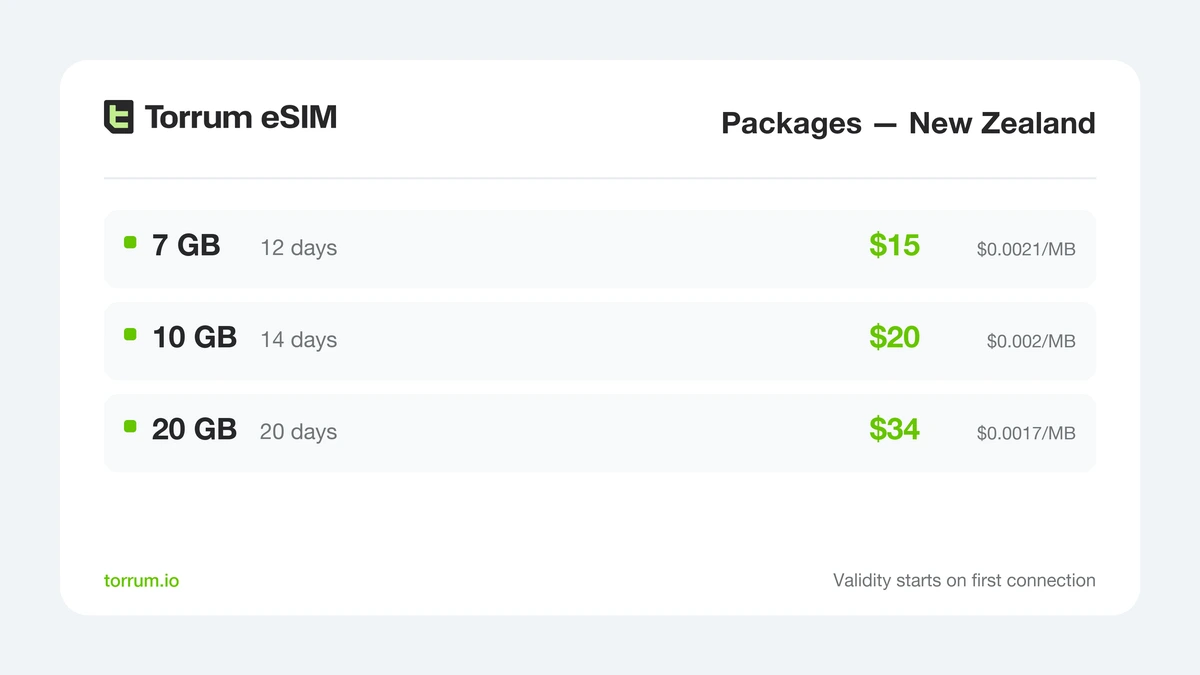
From a North Island week to a near three-week South Island run: pick the size of your trip.
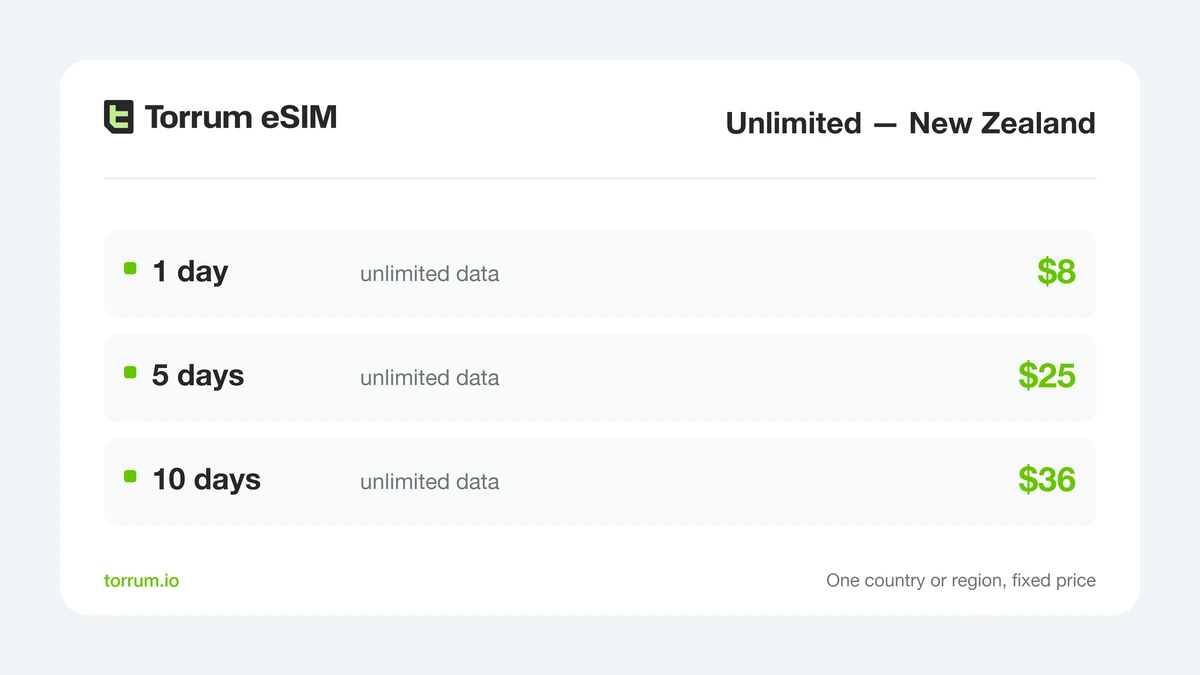
Day-priced Unlimited for video calls, big uploads or a working day from a motel room.
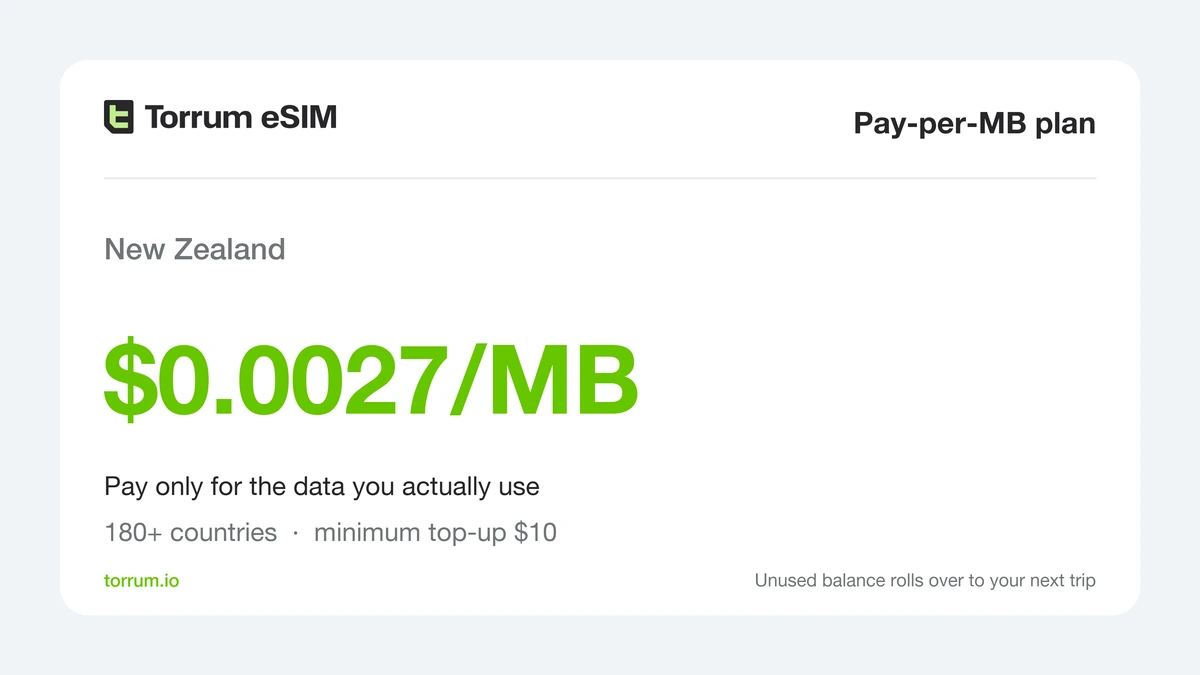
Metered Pay-per-MB, for an Auckland stopover or a phone that mostly stays on Wi-Fi.
Maps, messaging and photo uploads on a two-week road trip usually fit the middle package; evening streaming or daily video calls need the largest. For per-app figures, see how many gigabytes common apps use on a trip.
On Pay-per-MB, New Zealand data is billed at $0.0027 per MB from a balance you top up with at least $10; megabytes you never use cost nothing. Unlimited is priced per day. Packages work the other way: any unused gigabytes expire with the package.
Our New Zealand profile can roam on all three networks: One NZ, Spark and 2degrees. What it lacks: a local number and satellite texting. It also needs an unlocked phone with eSIM support.
Landing in Auckland or Queenstown
Auckland Airport offers free, unlimited Wi-Fi in both its domestic and international terminals. Choose the “Auckland Airport” network, click “Get online” and enter your details (airport page, checked 9 October 2026). Queenstown Airport gives each device 2 GB of free Wi-Fi every 24 hours on its “Queenstown Airport Free Wi-Fi” network.
Airport Wi-Fi ends at the terminal door. Many visitors collect a rental car or campervan straight off a long-haul flight, and the first drive is when you need maps. Keep online banking off public networks.
A campervan data routine

In a campervan you move every day, often sleep outside towns, and the next stretch of road may have no signal. A simple routine helps:
- Each morning in town, download offline maps for the day’s route and the area around tonight’s stop;
- Check road conditions while you still have signal, especially before the Milford Road or an alpine pass in winter;
- Keep the phone charging while you drive: searching for signal drains the battery;
- Send your plan for the day to someone at home before you leave coverage, and check in when you are back in range;
- Save large uploads for strong signal or a holiday park’s Wi-Fi.
Setting up before you leave: six steps
- Confirm the phone is eSIM-capable and carrier-unlocked on our compatibility list;
- Create an account at torrum.io: Google, Apple and Telegram logins all work;
- Choose a package for New Zealand, a few Unlimited days or Pay-per-MB credit, then pay with a bank card;
- Show the QR code on a laptop or tablet and point the phone’s camera at it while connected to home Wi-Fi. Screen-by-screen help for iPhone and Android is in the setup guide;
- Allow roaming on the new Torrum line only; your usual line stays on for calls and SMS, if your carrier supports 4G calling in New Zealand;
- Once you land, switch mobile data to the Torrum line. Its validity starts with that first New Zealand connection.
Something not working? Message our Telegram support bot. If you want WhatsApp, iMessage and bank SMS to keep arriving on your usual number, this guide explains the settings.
Roaming, a visitor SIM or Torrum compared
| What matters | Home plan roaming | NZ visitor SIM | Torrum New Zealand |
|---|---|---|---|
| Ready before you fly | Yes | One NZ eSIM bought online, activated by a call after landing | Yes, installed at home |
| Two weeks, typical cost | £84–£112 from the UK; $168 on a US day pass for one line | About $16 for 2 GB to $34 for 14 days of unlimited data | Fixed price, shown on the cards |
| Heavy use or streaming | Daily fee, allowance varies | 40 GB for about $39, or unlimited by the day | Up to 20 GB per package, or Unlimited days |
| Satellite texting beyond the towers | Check with your carrier | With One NZ on an eligible phone | No |
| Milford Road and the backcountry | Same towers, same gaps | Same gaps; satellite TXT on One NZ | Same gaps |
| Local NZ number | No | Yes | No |
| Your usual SIM keeps working | Yes | Yes with One NZ’s eSIM; a physical card needs a dual-SIM phone | Yes |
| Stays past three months | Costly by the day | Cheapest route | Not built for it: switch to a local plan |
City stopover, South Island loop or working holiday: which plan
A few days in Auckland or a transit stop. The smallest New Zealand package, or Pay-per-MB credit if maps and messages are all you need.
A two-week South Island loop. The middle or largest package, offline maps for Fiordland and the West Coast, and a power bank in the van.
Daily video calls or remote work. Day-priced Unlimited on the busiest days. For a month of heavy use, the 2degrees unlimited plan is the cheaper choice.
Working holiday, or three months and more. A local plan with a New Zealand number. Our guide for long-stay travellers explains the trade-offs.
FAQ
Is there mobile coverage on the Milford Road?
Very little. DOC says coverage is limited outside Te Anau; there are card phones at Knobs Flat and Milford Sound, and an emergency satellite phone at the Homer Tunnel.
Can I use One NZ satellite texting with Torrum?
No. Satellite TXT comes with One NZ’s own plans, including its Travel eSIM and Travel SIM, on eligible phones. Torrum does not include it.
Does iPhone Emergency SOS via satellite work in New Zealand?
Yes. It has worked since May 2023 on the iPhone 14 and later models, for contacting emergency services when there is no signal.
Will my phone be able to call 111?
Only if it supports 4G or 5G calling. New Zealand has switched off 3G, so check with your phone maker or carrier before you fly.
Which local networks can the Torrum profile join?
One NZ, Spark and 2degrees.
Is roaming free in New Zealand for EU residents?
No. EU roaming rules cover only the EU and EEA, so your plan’s worldwide rates apply.
Can I buy a SIM card at Auckland Airport?
Yes. One NZ has stores at the Auckland, Wellington, Christchurch and Queenstown airports, and 2degrees sells its travel SIM at selected airports.
Is the Wi-Fi at Auckland Airport free?
Yes, free and unlimited in both terminals. Queenstown Airport gives 2 GB per device every 24 hours.
Does a package bought weeks early lose days?
No. It starts on its first connection in New Zealand; unused data lapses on its final day.
How long does a New Zealand visitor SIM last?
One NZ travel bundles last 30 to 90 days, and the 2degrees plan is sold in blocks of up to 30 days.
Can I use Torrum while living in New Zealand?
No. The service is built for travel; its terms do not allow use in the country where you live.
Final thoughts: towns are easy, the gaps need a plan
Staying online in New Zealand is easy where people live. The challenge is the land between the towns: the Milford Road, remote stretches of road and the walking tracks, where towers often do not reach and a beacon matters more than a data bundle.
For a trip of up to two weeks with moderate use, a travel eSIM set up before departure is the least hassle: no store, no activation call, data from the arrivals hall. For a long stay, heavy streaming or satellite texting, a local plan is the better deal.
👉 Ready for the long flight? Choose your New Zealand eSIM, or read our US guide if your trip includes a stop in America.


 Continue with Google
  Continue with Telegram

