
Mobile data in the United States: what roaming costs, where the signal actually stops, and how a travel eSIM compares
Contents:
The United States expects 70.6 million foreign visits this year – a 3.4% recovery after a 5.5% fall to 68.3 million in 2025, according to the U.S. Travel Association’s Spring 2026 forecast published on 7 May 2026.
They arrive with phones that work perfectly at home and become an open-ended bill the moment they find an American mast. There are three honest ways to deal with that, and the two things that trip people up here are peculiar to this country: an activation clock that starts at the till, and a coverage map that means less than it looks like it means.
👉 United States plans, priced by the gigabyte
Roaming into the United States: the price of doing nothing

Doing nothing is itself a choice, and it is the default one. The phone finds an American mast on the taxiway, your number carries on ringing, and the meter starts.
What it costs depends entirely on where your bill lands. For UK travellers, the comparison site Uswitch lists worldwide day passes covering the United States at roughly £2 to £8 a day, with a week-long variant around £30 (Uswitch roaming guide, 2 June 2026 revision). A separate Uswitch guide adds that 20% VAT lands on roaming taken outside the EU (30 May 2025 revision).
And note what that price is not: the free-roaming rules covering EU residents inside the EU do not reach across the Atlantic. For a trip to the United States, every source market pays something.
Pros: nothing to install, your number keeps ringing, works from the runway.
Cons: you buy whole days rather than data, and the clock ticks on days you barely touch the phone.
The American pass that starts the moment you pay for it
Buying American is genuinely easy, and that deserves saying plainly. One major carrier’s traveller eSIM page answers the paperwork question directly: “Do I need ID or paperwork? No. There’s no paperwork or in-store visit required.” No photocopy, no form, no queue.
The pricing is competitive too. That traveller pass runs $25 for seven days, $30 for ten and $35 for fourteen, plus taxes and fees, and each tier adds North American calls and texts plus a large full-speed 5G data allowance inside the United States (carrier’s own page, checked 22 September 2026). If you want unlimited-style data and an American number, that is a strong offer.
The catch is the clock, spelled out in the same FAQ. “When does my plan start? Your plan starts immediately when you purchase it. The activation day counts as Day 1.” And: “Is advance plan purchase available? No. Plans activate instantly at purchase…” Buy it the night before a long-haul flight and you have spent one of your days asleep over the Atlantic. Buy it too early by mistake and the fix is a call to customer care, where, in the company’s own words, “refunds are limited.”
Which produces an awkward sequence: to buy the pass at the right moment you must already be in America – and to buy it at the airport you must already be online.
What a travel profile does instead
Nothing is posted and nothing is collected at a counter. What you buy is a carrier profile that downloads into a second slot beside whatever SIM is already in the phone, rides American networks as a visiting subscriber, and is paid for before you leave.
The practical difference from the pass above is timing. Torrum’s own instructions say to install before you travel and then “activate at destination” – within 30 days of purchase. So the whole setup happens on your own broadband before departure, with the clock left stopped until you reach the arrivals hall.
The limits are worth stating. The handset has to be eSIM-capable and free of a carrier lock, which excludes older models and the mainland-Chinese iPhone variants – the device compatibility page settles that before you pay. No American number comes with it, and it carries data only.
👉 Still weighing the three approaches? We set them against each other in a separate comparison.
Torrum plans for the United States: what data costs
You get three shapes to choose from. Every figure sits on a card rather than in a sentence, because a price list gets revised and a published paragraph does not.
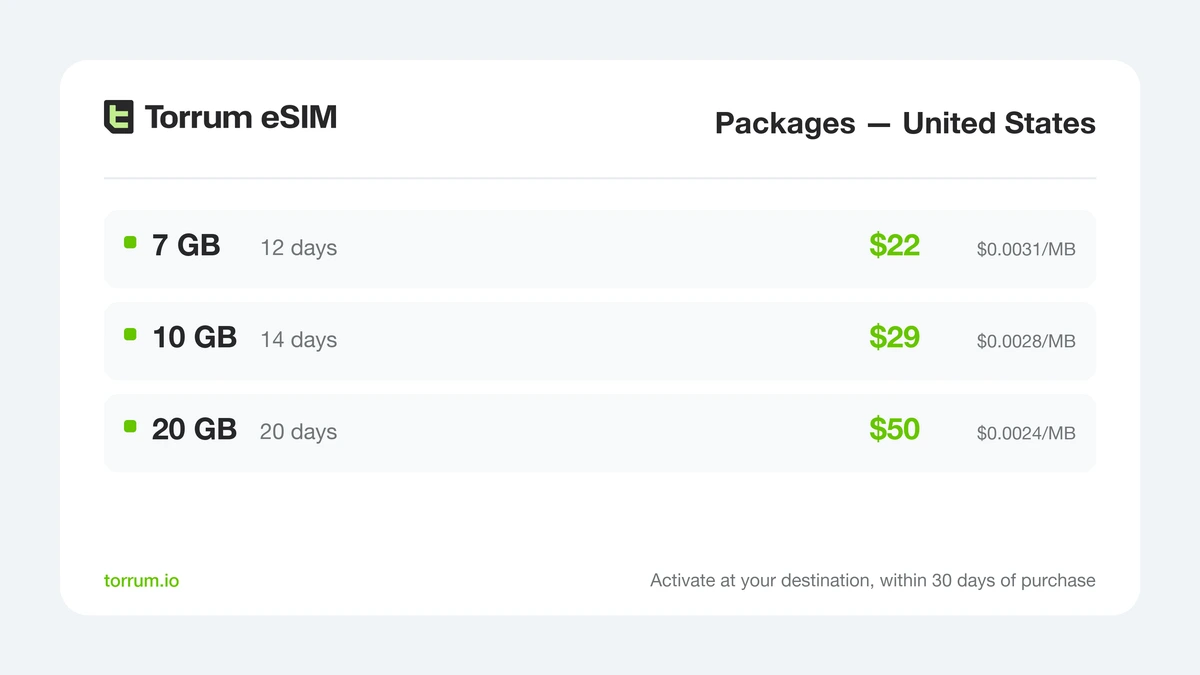
Country packages for the United States. The volume you pick sets the term, and the term does not start until you switch the profile on at your destination.
A package suits a trip with a known shape – a city break, a fortnight of driving, a conference with a week either side. Pick by how you expect to use the phone rather than by instinct; we worked through the arithmetic in a note on sizing a trip’s allowance.
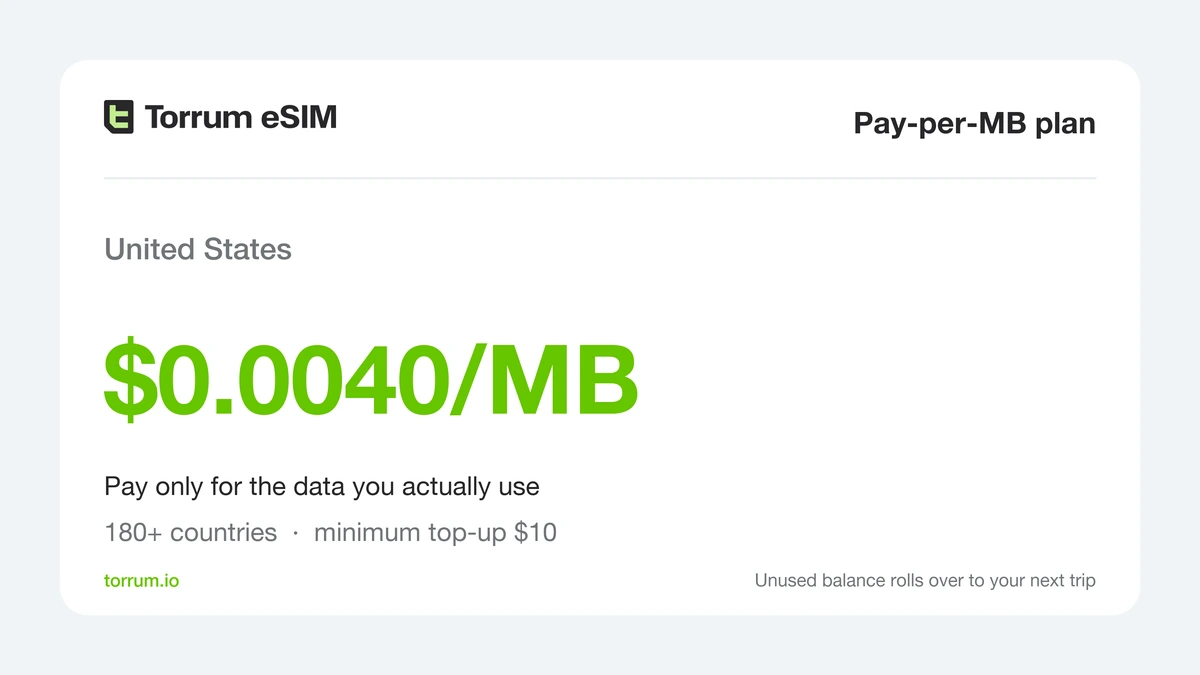
The metered rate for the United States stands at $0.0040 a megabyte; megabytes you never move cost nothing.
The Pay-per-MB plan is for trips you genuinely cannot predict. It works across 180+ countries from one balance with a $10 minimum top-up, and any balance left when you fly home can go towards a package next time instead of expiring. Fly in, work three days on hotel Wi-Fi, use maps between buildings: metered billing simply costs less.
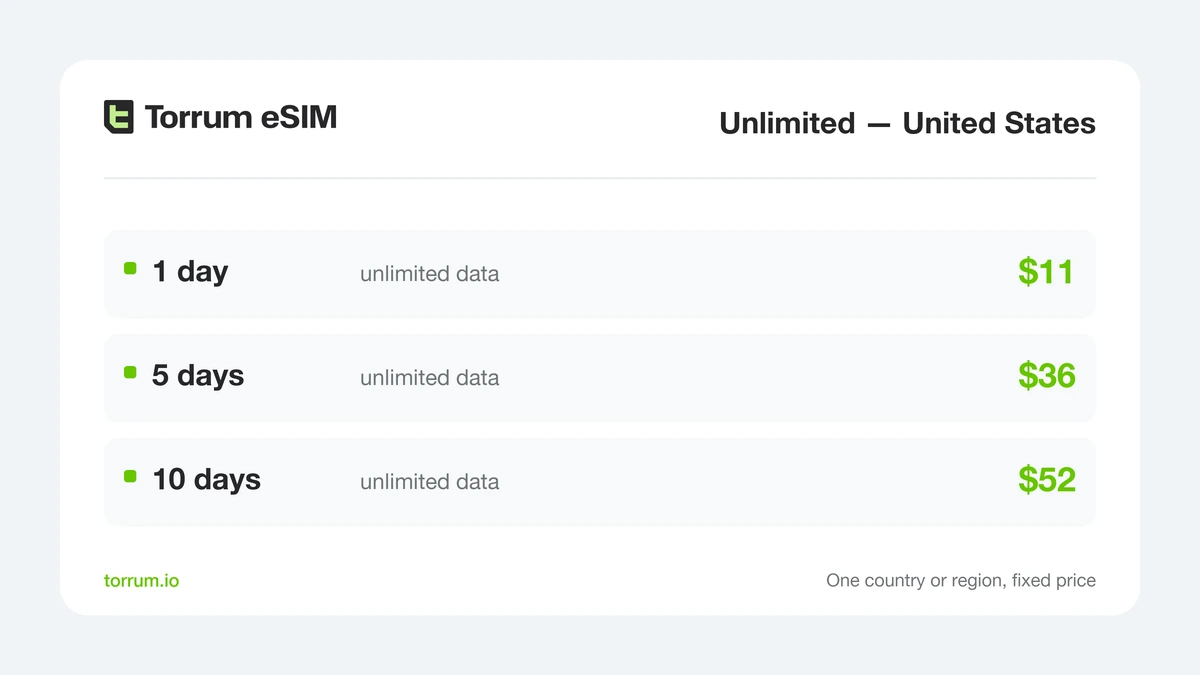
Unlimited days at a fixed price – the shape to buy when the phone, not you, is carrying the working day.
The Unlimited plan earns its place when you cannot afford to think about a counter at all: meetings back to back, a live-streamed site visit, a laptop tethered all afternoon.
If your route crosses a border, Torrum also sells a three-country regional plan covering Canada, Mexico and the United States. Stay within American borders, though, and the single-country package works out cheaper per megabyte.
The coverage map is a claim, and it is measured outdoors

The United States publishes a national, address-level coverage map that anyone can interrogate before travelling. The FCC’s National Broadband Map at broadbandmap.fcc.gov has a Mobile Broadband tab showing each provider’s reported reach, so you can trace a real route instead of trusting a marketing blob.
Two caveats come from the FCC itself. The map shows availability “as reported by Internet Service Providers (ISPs) in the FCC’s ongoing Broadband Data Collection” – provider claims, which the agency runs a formal challenge process to dispute. And that process reveals what the mobile map measures: to dispute coverage, the FCC asks you to run speed tests and to “take the tests while either outdoors or in a vehicle; do not take the tests indoors” (FCC Broadband Data Collection help centre, updated 15 May 2025). A shaded area is an outdoor, in-vehicle claim – not a promise about the inside of a motel or a parking structure.
So check the corridor you will actually drive rather than the state you will be in. A travel profile connects as a guest on American networks, so the reach you get is the reach those networks report – exactly what the map lets you look up in advance.
Wi-Fi covers the stops, not what is between them

American airports, hotels and coffee shops hand out Wi-Fi without charge, and at Los Angeles International the sign-in wants no local number.
It wants your attention instead. Los Angeles International offers free Wi-Fi in the public areas of all terminals and describes it as “unlimited 45-minute sessions”, with “an ad or a short video (15 to 30 seconds)” before each session begins (flylax.com, checked 22 September 2026). Unlimited, then, but re-clocked every three quarters of an hour.
The deeper problem is not the sign-in: it is the distance your day puts between two hotspots. A Wi-Fi-only strategy works for a Manhattan week and falls apart the moment your day includes a long drive, a trailhead, or a rideshare you need to summon from a car park.
Forty dollars before you board
None of the above is the first thing the United States asks for. Travellers from Visa Waiver countries need an approved ESTA, and its price changed recently: US Customs and Border Protection raised the fee to $40, effective 30 September 2025. An approval is “valid for two years or until a current passport tied to the ESTA expires” (NBAA, reporting the CBP change).
Separately, legislation created a $250 “visa integrity fee”. Its scope is worth being precise about: the fee attaches to applicants for non-immigrant visas, not to Visa Waiver travellers entering on an ESTA.
Two lines, one phone: what to switch and what to leave alone
Setting up a travel profile takes a few minutes at home and almost nothing on arrival. The order matters, because the download needs a connection of its own.
- Look your handset up on the compatibility page – eSIM capable and carrier-unlocked.
- Sign in through a Google, Apple or Telegram account, then pay by card.
- Load the profile by scanning its QR code while your home Wi-Fi is still in range – Torrum’s guide is explicit that a stable connection is required to pull it down.
- Leave the new line switched off until you arrive: you have 30 days from purchase to activate at your destination.
- Once you have landed, point mobile data at the travel profile, enable its Data Roaming toggle, and confirm the APN.
- Your original SIM stays the default voice line, so your usual number still reaches you.
Step five is the one to get right: a profile installed correctly but with Data Roaming left off looks exactly like one that is broken, when it is a single switch away from working. The screen-by-screen walkthrough covers both platforms, and the support bot on Telegram answers faster than an airport help desk.
The United States compared: three ways to pay
| What you care about | Home-network roaming | American prepaid pass | Torrum travel eSIM |
|---|---|---|---|
| When the charging starts | On arrival, per day | At the moment of purchase | When you activate, at your destination |
| Where you can buy it | Before you go | Practically, once you are online in the US | Anywhere, including before the flight |
| If your phone is carrier-locked | Still works | Will not work | Will not work |
| Your usual number | Keeps working | Sits alongside as a second line | Keeps working as the voice line |
| An American number | No | Yes | No |
| Calls and texts included | Yes, at roaming rates | Yes | Data only |
| Crossing into Canada or Mexico | Depends on your pass zones | Included on some traveller passes | Regional plan, or metered billing |
| Cost on a light fortnight | Highest – you pay per day regardless | Fixed, whatever you use | Lowest – metered, or a sized package |
| If plans change mid-trip | Keeps billing | Buy another pass | Top up, or roll the balance forward |
Five American trips, five answers
A long weekend in one city. Maps, restaurants, a rideshare app, photographs going home. A small country package covers it; weigh that against four days at your own roaming rate.
Two weeks of driving. Here distance drives the decision, not price. Size the package generously and trace the corridor on the FCC map first, whoever you end up buying from.
A day of back-to-back meetings. An unlimited plan removes the counting entirely, which earns its keep when a laptop is riding on it.
A North American loop. If Canada or Mexico is genuinely on the itinerary, the three-country regional plan saves buying three separate things.
A long connection on the way somewhere else. If the United States is a transit stop rather than a destination, metered billing is the right shape – we did the arithmetic of airport hours in our guide to layover data.
FAQ
Do I need a US address or an American bank card?
Not for a travel eSIM: signing in via a Google, Apple or Telegram account and an ordinary card is enough. Buying direct from an American carrier’s own web shop can ask for more.
Does a US traveller pass ask for ID or paperwork?
No. One major carrier’s own traveller FAQ states plainly that no paperwork and no in-store visit are required – unlike countries that tie every number to a passport.
Will my plan also work in Canada or Mexico?
A United States country package covers the United States. For a route crossing either border, use the three-country regional plan or metered Pay-per-MB billing, which follows you across.
Can I check the signal on my exact route before I go?
Yes, and you should. The FCC’s National Broadband Map has a Mobile Broadband view built from provider-reported data, so you can follow a highway rather than guess at a state.
Does a shaded area on that map guarantee a signal?
No. The FCC’s own challenge process asks for tests taken outdoors or in a vehicle and explicitly not indoors, so the mobile map is an outdoor, in-vehicle claim rather than an indoor promise.
Will I have coverage in the national parks?
Check the map rather than assume, and remember what it is: a provider claim measured outdoors. Download offline maps for anywhere you would not want to be lost.
Does the ESTA fee have anything to do with my mobile data?
Only in timing. ESTA is a border requirement, not a telecoms one – but both it and your data want sorting before you are standing in an arrivals hall with no connection.
Do I have to take my own SIM out?
No. The travel profile occupies a second line, your original one stays the default for voice, and only mobile data moves across.
Does an unused package expire?
A package runs to the end of its term once activated, used or not. Metered balance differs: whatever is left can go towards a package on a later trip.
Is a local pass or a travel eSIM cheaper for a fortnight?
It depends how heavily you use the phone. A fixed-price American pass wins on a heavy fortnight with lots of calls; a sized package or metered billing wins on a light one.
Final thoughts
America makes getting online simple, and overpaying for it just as simple. No paperwork is asked for at the traveller-pass stage, hotspots are plentiful wherever you stop, and the coverage claims are published for anyone to check. The costs come from timing, not bureaucracy: a roaming pass that bills by the day whether you use it or not, and a local pass whose first day is spent over the Atlantic.
So do the two things actually in your control. Install a travel profile while you still have your own Wi-Fi and leave it switched off until you land – then spend a few minutes with the FCC map on the route you have really planned.


 Continue with Google
  Continue with Telegram

