
Your real data appetite abroad: what an hour of each app costs, where the background spends it, and how to measure your own figure before you fly
Contents:
Nobody books a flight without checking the price. Almost everybody buys travel data without checking anything at all.
The guess almost always goes one way – generous – because running out sounds worse than overpaying, and because nobody has ever been shown what a gigabyte actually buys.
Here is the arithmetic, with sources: what an hour of each thing you do costs, where your own figure is hiding, and which shape of plan fits it.
👉 Two minutes, no reading? Size it on the packages page and buy once.
Start from the one number that already describes you

The global average smartphone got through 22 GB of mobile data a month at the end of 2025, and the forecast for 2031 is 42 GB (Ericsson Mobility Report, June 2026 edition).
Two things make it useful. It counts mobile data only – everything you burn on home and office Wi-Fi is already excluded. And it works out at roughly 5 GB a week of ordinary, unedited habits.
Abroad the mix changes rather than the total. Maps, translation and transport apps go up; long evenings of streaming go down, because you are out. Most people land near the same figure – and then buy well past it.
What an hour of each app actually costs
Averages are easy to argue with, so these are published figures. Where a number is derived, the bitrate behind it is named.
| What you are doing | Data per hour | Source |
|---|---|---|
| Video, basic quality | up to 0.3 GB | Netflix data-usage settings |
| Video, standard quality | up to 0.7 GB | Netflix, same page |
| Video, high definition | up to 3 GB | Netflix, same page |
| Video, 4K | up to 7 GB | Netflix, same page |
| Video call, 720p | about 1 GB | From Zoom’s published 1.2 Mbps each way |
| Video call, 1080p | about 3 GB | From Zoom’s published 3.8 up / 3.0 down |
| Music, highest quality | about 144 MB | From Spotify’s 320 kbit/s tier |
| Music, normal quality | about 43 MB | From Spotify’s 96 kbit/s tier |
| Podcasts | about 43 MB | Spotify podcasts, roughly 96 kbit/s |
All figures checked August 2026, and the shape of the problem is right there: one hour of HD video costs about as much as twenty hours of music at the highest quality. Everything that is not video is, by comparison, free.
Two details are easy to miss. A video call bills your upload as well as your download, which is why it lands close to streaming. And quality settings are not a marginal saving – dropping video from high to standard cuts it by roughly three quarters, on a screen small enough that you will not notice.
Navigation is the easiest line to cut to almost nothing

Maps are what travellers worry about most and what almost nobody overspends on: turn-by-turn navigation streams small tiles, not video, and costs a small fraction of any video row above.
Better still, you can take it to nearly zero. Google documents offline maps plainly: download the area in advance and it will guide you as long as the whole route sits inside the downloaded region. What you give up is specific – no live traffic, no alternative routes, and no transit, walking or cycling directions offline. Downloaded areas expire too, with a reminder fifteen days out (Google Maps Help, checked August 2026).
So the rule is not “budget for maps”. It is: download the city on hotel Wi-Fi the night before, and spend the mobile data on what cannot be downloaded.
Your own figure is sitting in your settings right now
Averages are a starting point; your phone has the actual answer, about three minutes away.
- On iPhone: Settings, then Cellular or Mobile Data – every app is listed with the data it has used. Reset the counter at the start of a normal month for a clean reading (Apple Support, checked August 2026).
- On Android: Settings, then Network & internet and the data-usage screen, which shows the billing period and a per-app breakdown.
- Then subtract. Cross out the apps you will not use abroad and the ones you only open on Wi-Fi. What remains is your real travel appetite.
Most people are surprised in the same direction: the number is lower than assumed, and one or two apps account for most of it.
Four things that spend data while you are not looking
The estimate people get wrong is rarely about what they do on purpose. It is the background.
- Photo backup. Google Photos backs up over Wi-Fi by default, but there is a separate “Back up while roaming” switch and a daily mobile-data limit (Google Photos Help, checked August 2026). A holiday makes more photographs and heavier video than a normal week, so this is the biggest silent line.
- App updates. A phone that has not updated in a fortnight will do it the moment it finds a network – at the airport, on your travel plan.
- Autoplay video in feeds. Social apps play video whether you asked or not, which quietly moves scrolling into the video rows of that table.
- Cloud sync for work. Shared drives and heavy attachments do not care which country they are in.
All four have off switches. Low Data Mode on iPhone pauses automatic updates and background tasks off Wi-Fi (Apple Support, checked August 2026), and Android’s Data Saver does the equivalent. Turning one on before departure is the cheapest thing in this article.
One laptop rewrites the whole estimate

Everything above assumes a phone. Tether a laptop and the arithmetic changes: it fetches full-resolution images instead of mobile ones, runs updates measured in gigabytes, joins calls at the best quality the connection allows, and syncs whole folders rather than the file you opened.
So if you will work for even part of the trip, do not add a margin to a phone-sized estimate – change the plan shape. A fixed-price block of Unlimited covers the working days without counting, which is the honest answer when a “quick check of email” becomes four hours on a shared drive.
Free Wi-Fi shrinks the bill less than you expect
Airport and hotel Wi-Fi do absorb the heaviest things you do – the overnight photo backup, the software update, the film downloaded before a flight. What they do not absorb is the day. Finding the platform, translating a menu, re-routing around a closed road, calling a taxi: those hours happen nowhere near a router. Wi-Fi moves the bulk, not the moments.
Which gives one habit: do the heavy lifting deliberately while connected – offline maps, downloads, backups – and treat open networks as public rooms, where a banking app can wait.
Torrum plans by appetite rather than by destination
Three plan shapes, and the choice follows how confident your estimate is rather than where you are going. The Europe region plan is used here as the worked example; every country has its own equivalents on the plans page.
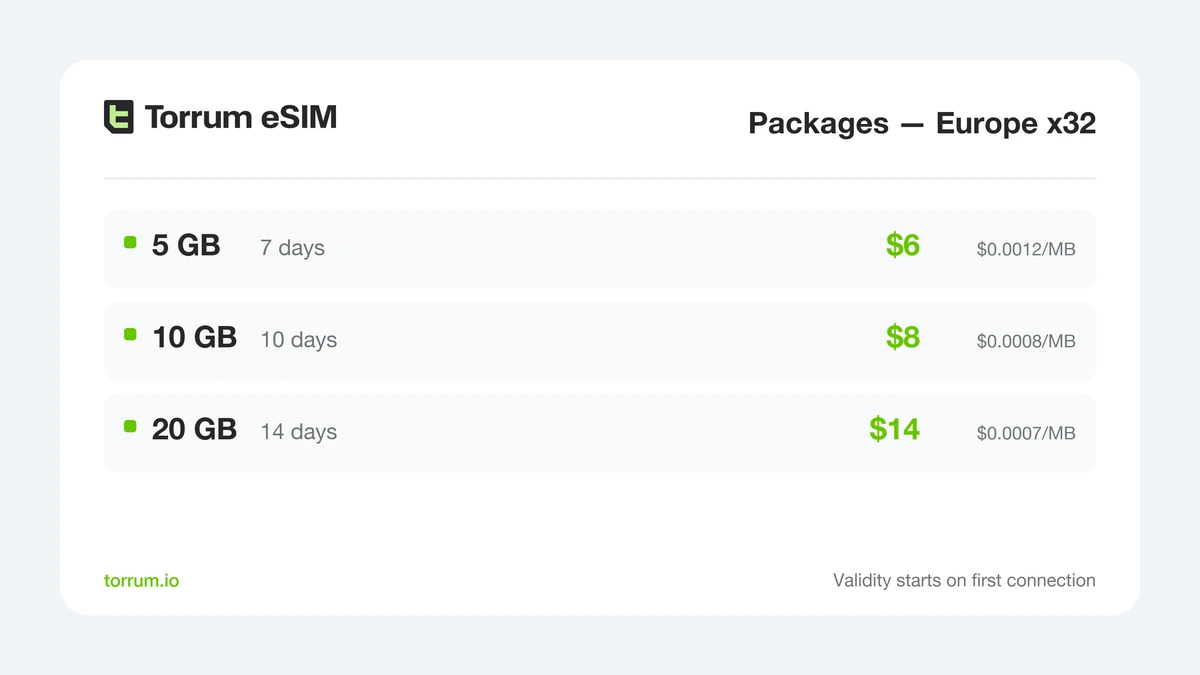
Package sizes for the Europe region. Nothing counts down until the profile registers abroad, so the purchase date is irrelevant.
If your own figure came out near the weekly baseline, the smallest package size already covers a week of it. The middle one is for a longer stay or a heavier phone; the largest is the only one whose validity stretches to a fortnight.
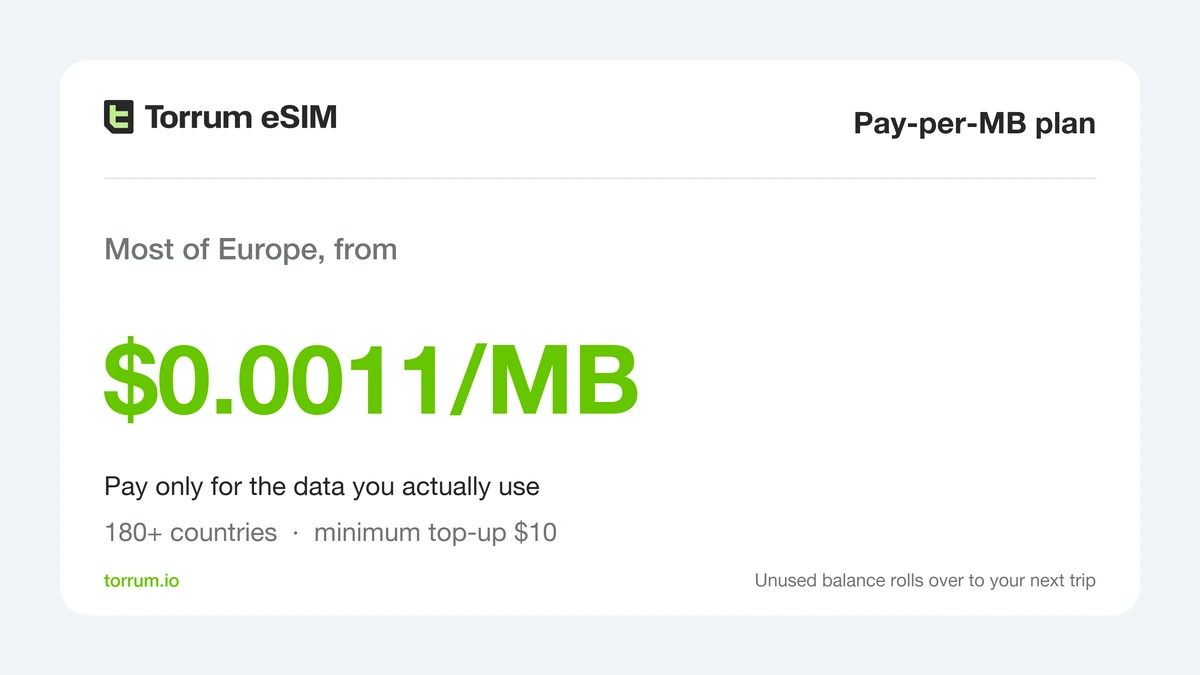
When the estimate refuses to settle, stop estimating. Pay-per-MB charges for consumption alone – from $0.0011 a megabyte in the cheapest tier, which covers most European destinations – and whatever you do not spend simply stays on the balance. Rates differ country by country, so check yours on the plan page.
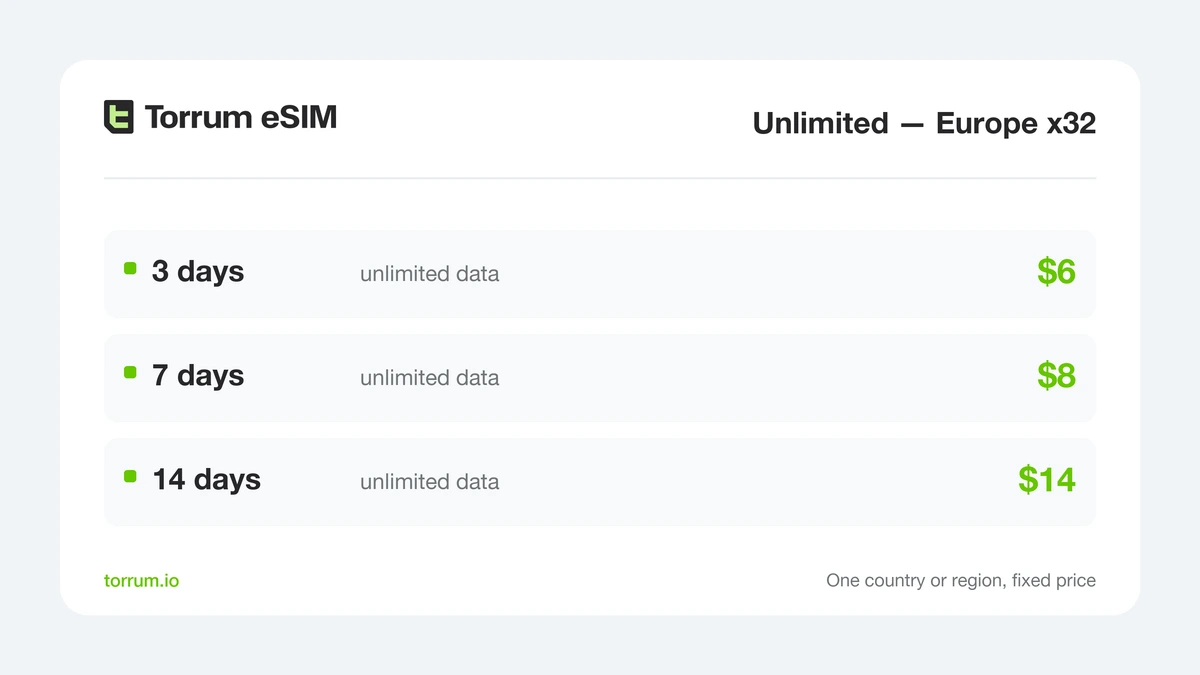
Unlimited for the same region – you buy days, not gigabytes, which is the right shape when any estimate would only be a guess. Worth holding against the packages card above before you decide.
Whichever shape you pick, the setup is the same and none of it happens at an airport counter:
- Check the handset on the supported devices list – eSIM support is the one hard requirement.
- Register with Google, Apple or Telegram and pay by card; the minimum top-up is $10.
- Scan the QR code to load the profile – every screen is captured in the app walkthrough.
- Enable Data Roaming on the Torrum profile only. Your own SIM stays where it is and keeps taking calls. The support bot is on Telegram if a step does not behave.
Running out and overbuying are not the same mistake
People buy generously because the two failures feel equally bad. They are not. Running out lasts as long as a top-up takes – on an eSIM, a couple of minutes in an app rather than a trip to a shop. Overbuying is quiet and permanent: a package expires with its unused allowance inside it, and nothing tells you.
So buy the size your measurement supports rather than the size that feels safe, and treat the top-up as the plan for being wrong. It is also why a metered balance behaves differently: with Pay-per-MB the leftover is next trip’s starting balance, not a loss.
Rules of thumb by the shape of the trip
If you skipped to the end, start here and check it against your own settings later.
| Shape of the trip | What actually decides it | Where to start |
|---|---|---|
| Long weekend, one city | Maps, messaging, a few bookings | The smallest package |
| Two weeks, one country | Photos, video calls home | The largest package |
| Multi-country route | Border crossings, not volume | Pay-per-MB, one balance |
| Working from the room | The laptop, not the phone | Unlimited for the days you work |
| Travelling as a family | Number of profiles, or one shared hotspot | One large package, tethered |
| A single day of meetings | Video calls end to end | The shortest Unlimited period |
| A long layover | An hour or two, then you are gone | Pay-per-MB, nothing to waste |
👉 Heading somewhere specific? Our guides to mobile data in Japan and Turkey apply all of this to one country at a time.
FAQ
How much mobile data does a week abroad usually need?
Around 5 GB matches the global weekly average, and covers maps, messaging, bookings, translation and photographs comfortably. That average leaves room for roughly seven hours of HD video a month – which is why streaming breaks it first, along with tethering a laptop.
What uses the most data on a trip?
Video, by a distance. One hour of high-definition video costs about what twenty hours of music streaming does.
Do maps use a lot of data abroad?
No – and you can take it close to zero by downloading the area in advance, as long as your whole route sits inside the downloaded region.
Does tethering a laptop really use more?
Substantially. Laptops fetch full-resolution content, run large updates and sync whole folders – budget for a different kind of trip, not a bigger phone.
Does 5G use more data than 4G?
Not for the same content – a megabyte is a megabyte. It arrives faster, which is exactly why apps quietly pick higher video quality on it.
Can two of us share one plan?
Yes, by turning one phone into a hotspot. It is usually cheaper than two plans, and it puts the whole group’s appetite on one allowance.
What happens if I run out mid-trip?
You top up in the app in a couple of minutes, or switch to Pay-per-MB. Nothing needs a shop or a counter.
Do unused megabytes expire?
A package expires with its allowance at the end of its validity. A Pay-per-MB balance does not – it carries into the next trip.
Does the clock start when I pay?
No. Validity begins the first time the profile registers on a network abroad, which is why the purchase date does not matter.
Can I use a travel eSIM at home?
No – and this is a terms question rather than a technical one. The service is not intended for use in your country of habitual residence.
Final thoughts: buy for the trip you are taking
The summary is short. Video decides your total and almost nothing else does; your phone will show you your own figure in three minutes; the background is where estimates go wrong; and a laptop is not a bigger phone.
Run those four checks and the decision stops being a guess. You will usually find you need less than you were about to buy – and on the trips where you genuinely cannot tell, one plan shape removes the question instead of pricing it.
👉 You have a figure now. Match it to a package size – and if roaming still looks like the cheaper answer, here is what it actually costs.


 Continue with Google
  Continue with Telegram

