
Travel eSIM, same phone number: how to keep WhatsApp, iMessage, bank codes and calls on your home line while data runs over the eSIM
Contents:
You land, check in, and the hotel’s booking app asks for a code it has just sent by SMS – to a SIM you switched off at the gate to avoid roaming charges. The data eSIM is working perfectly. The number the world knows you by is not.
A travel eSIM is meant to carry your mobile data, not to replace your identity. With the right settings, the home number stays reachable for texts, WhatsApp, iMessage and calls, while the eSIM does the downloading – and the home line never touches roaming data.
This guide goes app by app and setting by setting, for iPhone and Android.
👉 Unsure whether your model can hold an eSIM beside its SIM? Check the device list first, then browse data packages.
A home line and a data line, each with one job
Dual-SIM phones keep two numbers registered at once, but they send data through only one. Apple’s Dual SIM documentation limits an iPhone to a single cellular data connection at any moment, and Google’s Pixel help says only one SIM can be the default for data.
That limit is what makes the setup work. You give each line one job:
- Home line: calls, SMS, your number for WhatsApp and iMessage – with its data roaming switched off;
- Travel eSIM: mobile data only, with roaming switched on for it.
On an iPhone you pick which number is the default and which one handles cellular data; on a Pixel, the choices sit under Settings > Network & internet > SIMs, for calls, texts and mobile data separately. Samsung’s SIM manager lets you set a preferred SIM for calls, texts and data in the same way.
WhatsApp belongs to the number, not to the SIM

WhatsApp is registered to your phone number, but once it is set up it runs over any internet connection – Wi-Fi, the home line’s data or a travel eSIM. Moving data to the eSIM does not change your WhatsApp account, and your contacts keep seeing the same number.
The weak point is re-verification. If you reinstall the app, switch phones or get logged out while abroad, WhatsApp needs to confirm the number again. Its help centre says the code comes by SMS or phone call to that number – or by email, if you have added an email address to your account. It also warns that roaming or connectivity issues can make codes hard to receive abroad, and that turning roaming on to get the SMS may cost extra.
So before you fly:
- add an email address in WhatsApp’s account settings, so a code can reach you without SMS;
- make sure your chat backup is current;
- avoid reinstalling or changing phones mid-trip.
Calls inside WhatsApp run over data too, so they use the eSIM too. Some countries restrict them – our UAE guide explains the rules there.
iMessage and FaceTime: choose the number on purpose
Apple’s Dual SIM guidance lets you choose either or both numbers for iMessage and FaceTime.
For travel, the setting that matters is, on recent iOS, under Settings > Apps > Messages > Send & Receive. There you can check which phone numbers and email addresses you receive iMessages at and reply from. Keep your home number ticked there; a travel eSIM that carries data only has no number of its own to offer your friends anyway.
iMessage and FaceTime then send and receive over whichever line carries data – the eSIM – while still showing your home number. Standard SMS is a different path: it goes over the mobile network of the line it belongs to, which brings us to texts.
Bank codes, texts and calls on the home line
Many banks, airlines and apps still send one-time codes as ordinary SMS. They reach you when the home line is switched on and registered on a local network – which is exactly why switching the home SIM off entirely is a bad idea.
The price of staying reachable varies with the destination and the tariff:
- Inside the EU, on an EU plan, receiving calls or texts while roaming carries no extra charge under EU rules (Your Europe, last checked January 2026);
- Elsewhere, incoming texts may or may not be charged: check your network’s roaming page for the country;
- Incoming calls can be expensive outside your plan’s included zone. One UK network lists £3 a minute to receive calls in the UAE (Uswitch’s UAE page, June 2026).
The practical compromise: leave the home line on for texts, turn its data roaming off, and answer only the calls that matter. Some banks let you approve logins in their app instead of by SMS – worth setting up before the trip if yours does.
Three settings that can quietly use the home line’s data

Modern phones try to keep you online, sometimes by borrowing the other line. Three features to know about:
- iPhone – Allow Cellular Data Switching. Apple says that with this on, your voice-only number switches to voice and data during a call on it. Apple notes that this switching won’t work while you’re using Data Roaming.
- Samsung – Auto data switching. In the SIM manager, Samsung describes it as switching networks if the preferred SIM fails. If the eSIM loses signal in a tunnel or valley, the phone may fall back to the home SIM’s data.
- Pixel – Automatic data switching. On Pixel 8a and later, Google describes a setting under Settings > Network & internet > SIMs that can switch data to the other SIM during calls on it.
The simplest protection is the same on every phone: with data roaming off on the home line, a fall-back has nowhere expensive to go. Check it in the per-SIM settings after you install the eSIM.
Wi-Fi calling: the home number without the roaming network
Wi-Fi calling lets a phone make and receive ordinary calls over a Wi-Fi connection instead of a mobile network. Whether it works abroad, and whether those calls are billed as domestic, depends on your home carrier, your plan and the country you are in.
If your carrier supports it, it is the neatest way to keep the home number reachable in a hotel room.
Before you go, check your carrier’s roaming page, or ask it directly, whether Wi-Fi calling works in your destination.
Torrum plans for the data side
Once the home line is set to calls and texts, the travel eSIM only needs to cover data. Here is Europe as an example.
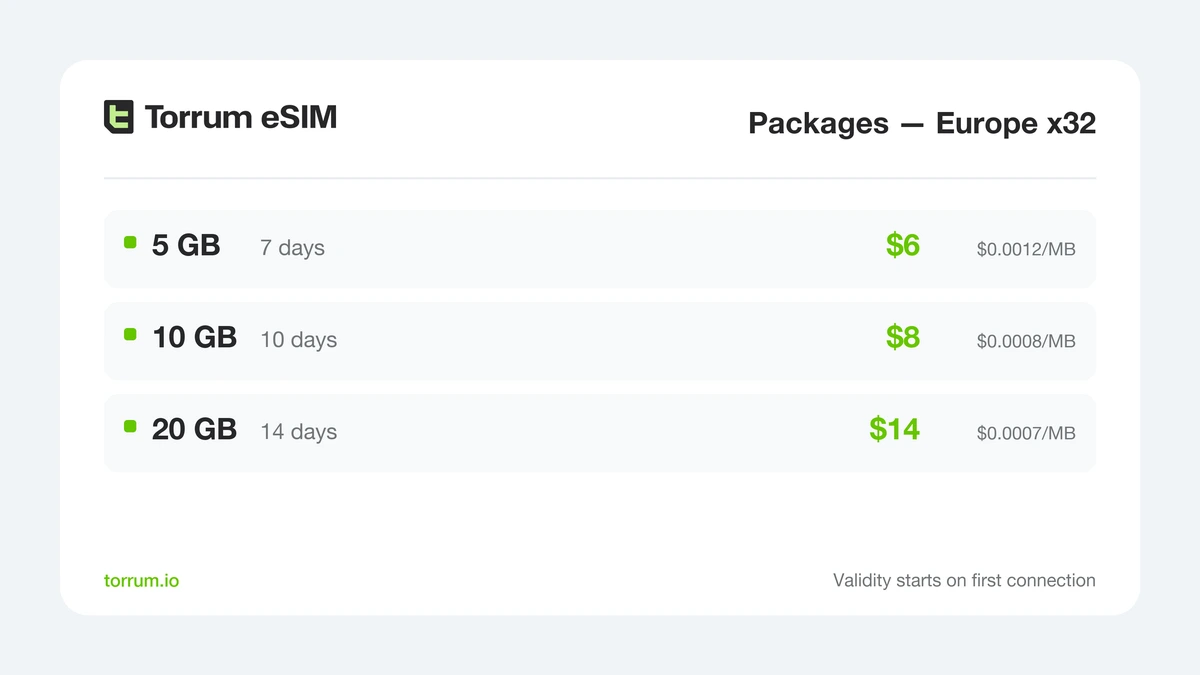
Europe x32 Packages: one data profile across 32 countries, next to your home number.
A package’s clock starts when it first connects abroad, and leftover gigabytes vanish when its period ends. For light, irregular use, Pay-per-MB bills megabytes from a prepaid balance – in Spain, Italy or Greece at $0.0011 per MB – and unused credit stays for the next trip.
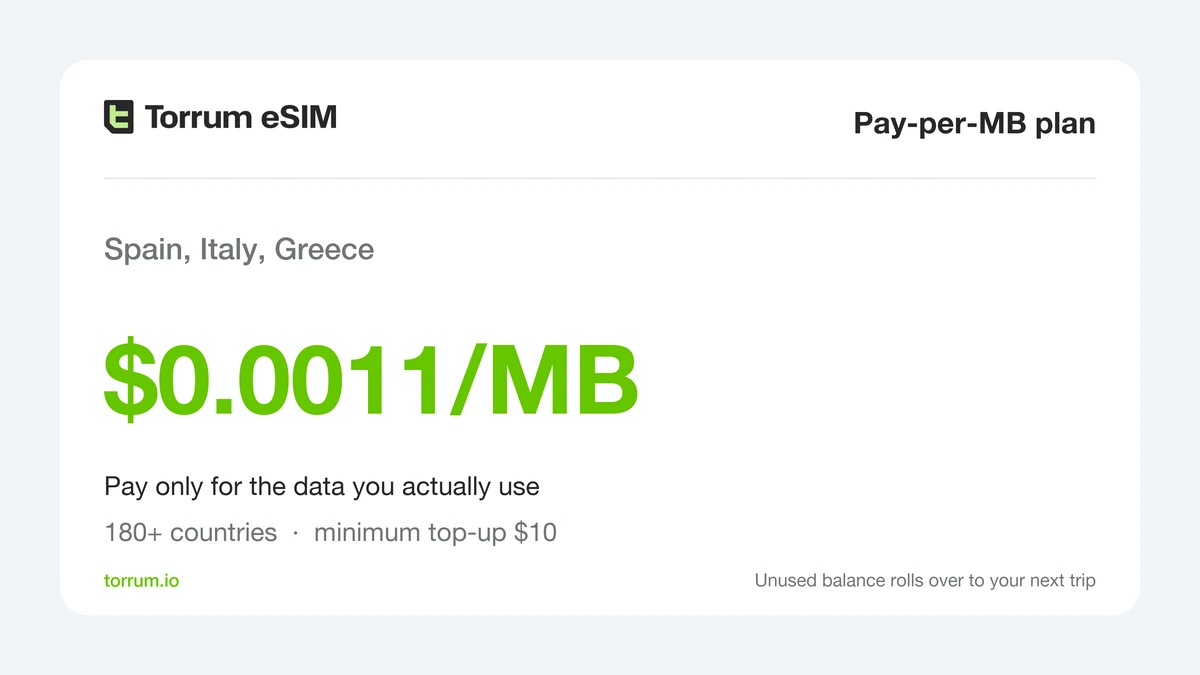
Pay-per-MB: a metered balance for trips where data use is hard to predict.
For days full of video calls and uploads, Unlimited sells data by the day instead.
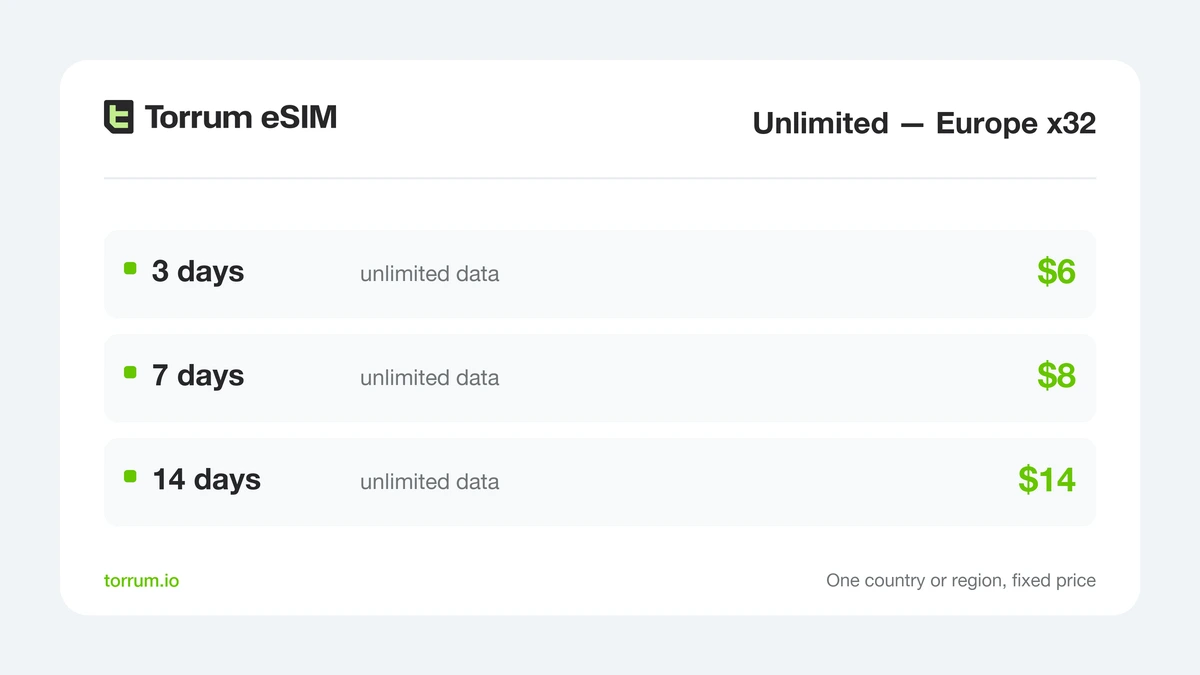
Europe x32 Unlimited: fixed days, no gigabytes to count.
For how eSIM, a local SIM and roaming compare on a real trip, see our comparison guide.
Before the flight and on landing

- Check your model on the supported devices page, and make sure your carrier has not locked the phone – our compatibility guide shows how.
- Buy the data plan and add it before you leave, over Wi-Fi, using the illustrated setup steps.
- Label the lines clearly – “Home” and “Travel” – so you know which is which in every menu.
- Keep Home as the default for calls and texts, and review the automatic data switching setting for your phone model.
- In WhatsApp, add an email address; in Messages, confirm your home number under Send & Receive.
On landing: switch mobile data to Travel and turn its data roaming on; turn data roaming off for Home.
Questions mid-setup? Write to Torrum’s Telegram helpdesk from any Wi-Fi.
Which line does what: a cheat sheet
| Task | Runs over | Home line setting | Watch out for |
|---|---|---|---|
| WhatsApp chats and calls | eSIM data | Stays on for re-verification | Local call restrictions; add email for codes |
| iMessage and FaceTime | eSIM data | Home number ticked in Send & Receive | Number selection after installing the eSIM |
| Bank and app SMS codes | Home line network | On, data roaming off | Incoming SMS charges outside the EU |
| Ordinary calls | Home line network or Wi-Fi calling | On | Incoming call charges abroad |
| Maps, browsing, uploads | eSIM data | Data roaming off | Automatic data switching |
FAQ
Does WhatsApp keep my usual number when data comes from an eSIM?
Yes. WhatsApp stays registered to your number and only uses the eSIM for internet access.
What if WhatsApp asks me to verify my number abroad?
The code goes by SMS or call to your number, or by email if you added one. Keep the home line on so it can arrive.
Can I receive bank SMS codes while using a data eSIM?
Yes, as long as the home line is switched on and attached to a local network. Check whether your plan charges for incoming texts outside the EU.
Should I turn my home SIM off completely?
Not if you need your texts. Turn off its data roaming instead, so it can still receive texts and calls.
Why did my phone use my home SIM’s data?
One possible cause is an automatic data switching feature falling back to it. Turn off data roaming on the home line to block that.
Does iMessage work over the eSIM’s data?
Yes. It uses the data line while showing the number you ticked under Send & Receive.
Does a Torrum eSIM come with a phone number?
No, it is data only. Calls and SMS stay on your home line.
Can I use Wi-Fi calling abroad?
That is up to your home carrier, your plan and the country you are in. Test it before the trip.
Is incoming SMS free when roaming?
Inside the EU on an EU plan, yes. Elsewhere it depends on your plan.
Does the Torrum eSIM work in my country of residence?
No. Torrum is a roaming service for trips abroad, and its terms rule out your home country.
Final thoughts: one phone, two roles
The mistake is treating the travel eSIM as a replacement for your number. It is a data pipe. Your home line stays the identity: the number WhatsApp, iMessage, banks and airlines have on file.
Set the roles once – home for calls and texts with roaming data off, eSIM for data – and both work for the whole trip. For longer stays abroad, our guide for digital nomads takes the same idea further.
👉 Ready to split the jobs? Choose a data package and keep your number where it is.


 Continue with Google
  Continue with Telegram

