
Add travel eSIM to your website: banners, a live price widget and a free price feed that pay you 20% of every purchase
A traveller books a flight or a hotel with you, and somewhere between the confirmation email and the airport the same question comes up: will my phone work when I land? That moment belongs to whoever answers it first.
This article is for travel businesses that want to answer it on their own pages: with a ready-made banner, a live eSIM price widget, or Torrum prices pulled into their own interface from a free JSON feed. All three carry your referral code, and all three earn you 20% of what the customers who sign up through them spend on mobile data.
👉 The code, the banners and working examples are in the partner guide (PDF).
Contents:
Why a travel site should show eSIM prices at all
Mobile data is one of the last things a traveller sorts out and one of the first they need on arrival: the taxi app, the map to the hotel, the booking reference sitting in an inbox. If your site says nothing about it, the traveller asks a search engine, and the answer comes with somebody else’s link.
Showing a price next to the trip changes that. The traveller sees what data costs for the country they have just booked, buys before leaving, and lands online. If they signed up through your link, you earn a share of that purchase and of every purchase they make afterwards.
It matters most where roaming is expensive: long-haul holidays, trips outside the traveller’s home region, routes through several countries. An EU resident travelling inside the EU already roams at home prices, and your pages should not pretend otherwise. A British traveller heading to Spain, an American going to Japan, or anyone flying to the Gulf is a different story.
Torrum is the travel eSIM brand of LANCK Telecom group, a telecom carrier since 2001, and runs on its own GSMA-certified eSIM platform. The customer buys and installs on torrum.io, and Torrum support helps them around the clock, so your team never has to troubleshoot a phone.
Three tools, one referral code
There are three ways to put Torrum on your site. They differ in effort, not in what you earn.
| Tool | Effort | Best for | What the customer sees |
|---|---|---|---|
| Ready-made banners | About five minutes, no developer | Blogs, newsletters, agency sites | An image that opens torrum.io |
| Live price widget | Two lines of HTML | Destination pages, travel guides, booking pages | Current prices for one country or a list of countries |
| Partner price feed | A developer, once | Booking flows, apps, comparison tables | Torrum plans inside your own interface |
Whichever you pick, the mechanics are the same. Every link carries your code. A customer who signs up right after following it is linked to you, and from then on their purchases count for you with no time limit.
You can also combine them: a banner in the newsletter, the widget on destination pages and the feed in the booking flow, all with the same code and one report.
Ready-made banners: the five-minute option
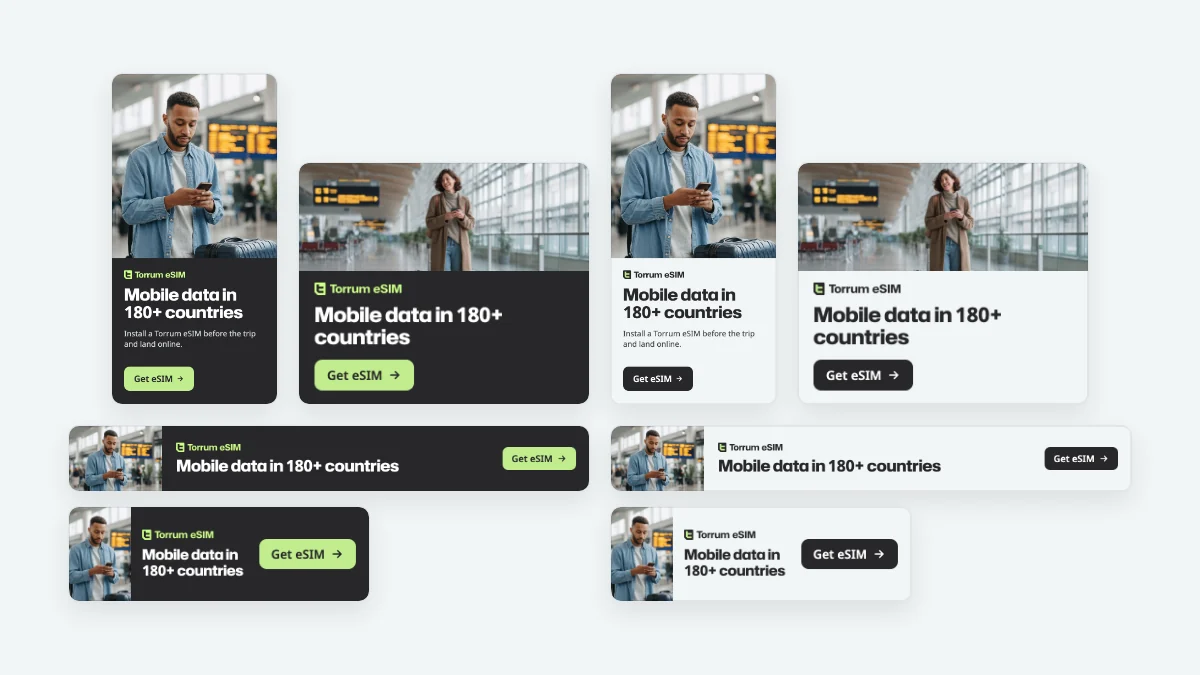
Eight banners cover the four standard ad sizes: half page (300 x 600), medium rectangle (300 x 250), leaderboard (728 x 90) and large mobile banner (320 x 100), each in a dark and a light version.
There are no prices on them, on purpose. Prices move; a banner placed in a sidebar today should still be true a year from now.
To use one, wrap the image in your referral link. The image can load straight from torrum.io, so there is nothing to download or host. The partner guide has the exact code and direct links to every file.
- Sidebar or article column: the half page or the medium rectangle.
- Newsletter: the medium rectangle. For email, use the PNG version from the partner kit: some email programs do not show WebP images.
- Top of a page: the leaderboard on desktop, the large mobile banner on phones.
The live price widget: current prices in two lines of code
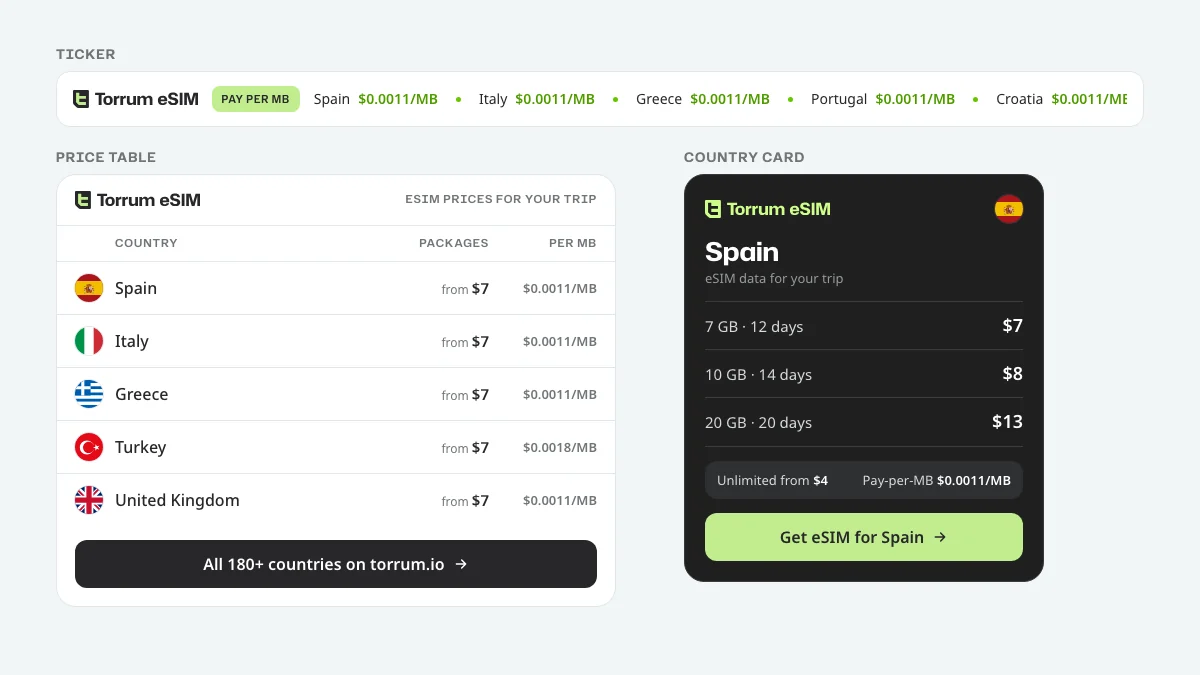
A banner says that Torrum exists. The widget shows what it costs, for the country your visitor is reading about, with prices that update by themselves.
You paste two lines into the HTML of a page: a placeholder that says which view you want and which country, and one script from torrum.io. That is the whole installation. No server, no developer, and it works on site builders that accept custom HTML.
There are three views:
- Country card: one country, its three data packages, the lowest Unlimited price, the Pay-per-MB rate and a button that opens that country on torrum.io. Made for destination pages.
- Price table: a list of countries you choose, each with its lowest package price and the Pay-per-MB rate. Made for “where to go” pages and shortlists.
- Ticker: a scrolling line of Pay-per-MB rates by country. It stays still for visitors who have turned on reduced motion in their system settings.
The widget comes in light and dark versions, fits a narrow sidebar from 280 pixels wide, and every link in it carries your referral code. You can see all three views working on the partnership page.
👉 Copy-ready code for every view is in the partner guide.
The partner price feed: every plan and price in JSON
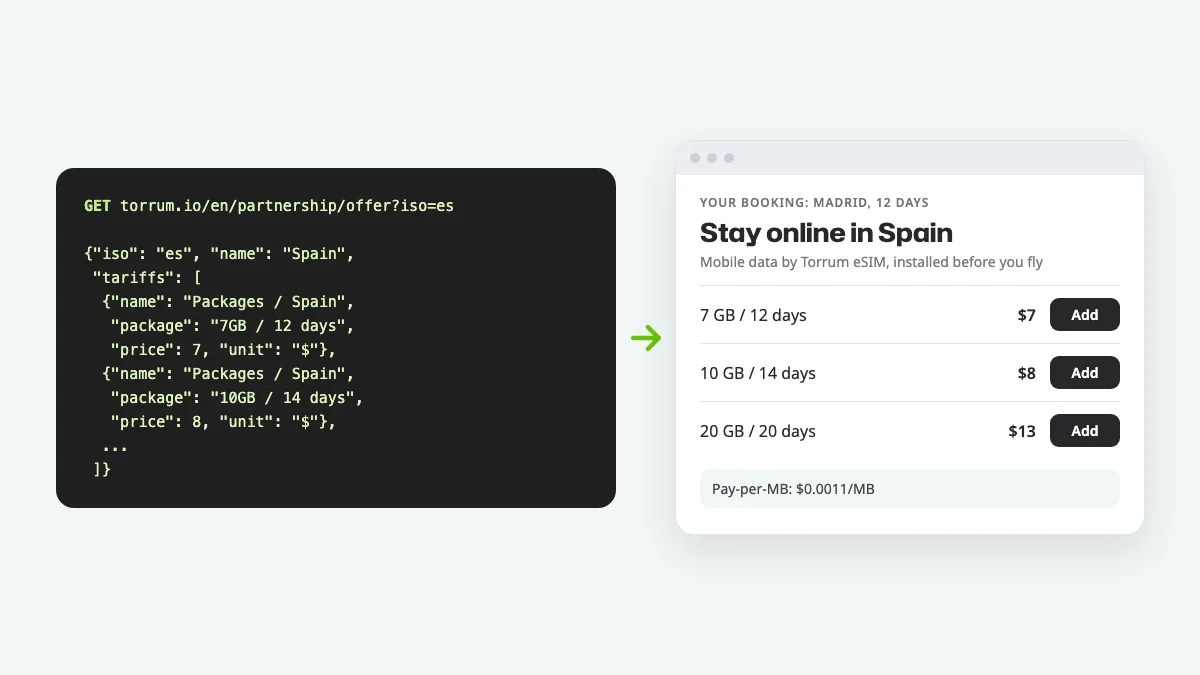
If you have a developer and your own booking flow, the feed lets you show Torrum plans in your own design: on the confirmation page, in the app, next to the hotel.
It is a public price API at one address. No key, no sign-up, no rate card to request:
- All countries: https://torrum.io/en/partnership/offer
- One country: https://torrum.io/en/partnership/offer?iso=es
- Several countries: https://torrum.io/en/partnership/offer?iso=es,it,gr
The response lists, for each of 190 countries, every plan on sale with its price in US dollars: Packages for the country or its region, the Pay-per-MB rate and Unlimited day plans. Each row comes with the link to its plan page, so building a “Buy” button is a matter of adding your code.
Two rules keep your pages honest. Fetch the whole feed about once a day rather than on every page view, and replace your copy completely each time: a plan missing from the response is no longer on sale. The feed has the same prices as torrum.io; show them as they come, and note that prices can change during the day: the price at checkout on torrum.io is the one that applies.
The partner guide describes every field and the error responses, and has two tested examples: one in JavaScript that builds offers for a trip country, and one in PHP that refreshes the whole catalog once a day.
Where each tool fits in a traveller’s journey
The same traveller passes your brand several times before a trip. Each touchpoint suits a different tool.
| Moment | What the traveller wants | Tool that fits |
|---|---|---|
| Reading about a destination | Ideas and practical tips | Country card inside the article |
| Comparing destinations | A quick overview | Price table for the shortlist |
| Booking confirmation page | What else to sort out | Feed: plans for the booked country, in your design |
| Pre-trip email | A checklist | Banner with your link |
| Your app | Everything in one place | Feed, refreshed daily |
| At the counter or by phone | A straight answer | Your link, or a promo code from your commission |
The strongest moment is right after booking. The destination and the dates are known, the trip feels real, and data is still unsolved. A short block with plans for exactly that country is where an offer is most likely to be taken up.
The weakest spot is a generic footer link: nothing on the screen connects it to a trip. If you only place one thing, place it where the destination is already visible.
Your referral code: where it lives and how links carry it
Every torrum.io account has a referral code. Sign in with Google or Telegram, open “Referral program” in your account, and you will find two personal links: one for the website and one for the Torrum Telegram bot. The code is the part of the website link after ?ref=.
- Banners: link the image to your website link.
- Widget: put the code into the widget’s data-ref attribute; every link inside the widget then carries it.
- Feed: add ?ref= and your code to the plan link from the response. For a country’s own Packages and Unlimited plans you can also add #country_ and the two-letter country code, and the plan page opens with that country expanded.
A customer is linked to you when they sign up on torrum.io right after following one of these links. From then on every purchase they make counts for you, including the one a year later.
Before going live, click your own link once: it should open torrum.io with ?ref= and your code in the address bar.
What you earn
The tools sit on top of the Torrum referral program, so the standard terms are the same for everyone:
- 20% of every purchase by the customers who signed up through your link, for as long as they keep buying, not just the first time.
- Commission can be withdrawn once it reaches $100: as Torrum promo codes, instantly, or in cash under an agency agreement, paid per closed period, at least ten days after your request.
- Promo codes are valid for one year and transferable: a code can go into a client’s welcome pack or a booking confirmation.
- Your account shows users, commission and income, with a monthly report you can download as Excel.
The Torrum affiliate program article covers the terms in detail, including how they compare with other eSIM programs and when premium terms for large agencies and communities apply.
Selling eSIM yourself: reseller and white label
Banners, the widget and the feed all send the customer to torrum.io to buy. For many partners that is exactly right: no payments to run, no support to staff.
Some businesses want the sale to happen on their side. Resellers buy eSIMs at wholesale prices and sell them in their own checkout at their own margin; setup takes about a month. White label goes further: an eSIM store under your brand and domain, with your prices and design, while Torrum runs payments, support and compliance, launched in three to four months.
Both start with a request on the partnership page and are agreed individually. The feed is a natural first step: it lets your developers see the catalog before any contract. For a wider look at how companies use eSIM, see eSIM for travel businesses.
FAQ
Is the Torrum price feed free?
Yes. There is no key, no sign-up and no fee: we charge nothing for it. You earn from the purchases it brings.
Do I need a developer for the widget?
No. If you can paste HTML into a page, you can install it. The feed is the only tool that needs a developer.
How often do the widget prices update?
By themselves, from torrum.io, about every ten minutes. You never edit a price by hand.
Can I call the feed from the browser?
No. The feed is meant for your server: fetch it there and keep a copy. In the browser, use the widget, which reads a copy that torrum.io prepares for exactly that.
Which countries does the feed cover?
190 countries at the time of writing, the same list as torrum.io. Countries and plans change, which is why the feed should replace your copy each time.
Can I change the widget’s colours?
You can choose light or dark. The rest keeps the Torrum style so the prices are recognisable as ours.
Will the widget slow my site down?
It is one small script that loads after the page and needs no other libraries. If your site already uses the Hubot Sans and Noto Sans fonts, the guide shows how to skip loading them again.
What if a customer signs up today but buys a month later?
If they signed up right after following your link, the purchase counts for you, a month later or a year later.
Can I use the tools in emails?
Banners, yes: they are plain images with a link; use the PNG versions in emails. The widget needs a web page, because email programs do not run scripts.
Can I put several widgets on one page?
Yes: a ticker at the top and a card further down, for example. Add the script once per page; it fills every placeholder it finds.
Who helps my customers if something goes wrong?
Torrum support, around the clock, through the support bot. Your team does not need to learn eSIM settings.
What does the widget show if a country is not on sale?
The table simply leaves that country out, and a card shows a plain link to torrum.io instead of prices. Nothing breaks on your page. Before recommending eSIM in general, it is worth linking the supported devices list.
Final thoughts: answer the question before a search engine does
Your customers will buy mobile data for their trip one way or another. The only open question is whether the answer comes from you, at the moment they are already looking at your page, or from whoever ranks first for “eSIM” a week later.
Start small: a banner takes five minutes, the widget a few more, and the feed waits until your developers have an afternoon. All three pay the same 20% on every purchase by the customers they bring.
👉 Everything in one place: the partner guide (PDF) and the partnership page.


 Continue with Google
  Continue with Telegram

