
Taking an iPad, smartwatch or laptop abroad: which devices can run their own travel eSIM, and how the rest get online
Contents:
Travel eSIM guides usually assume one device: the phone. Real luggage looks different. There is a tablet for the flight and the maps, a watch that wants to sync, and often a laptop for work emails between sights.
Some of these can take a travel eSIM of their own. Others cannot, whatever the box says about “cellular”. The difference comes down to two things: whether the device has its own cellular modem, and whether it accepts a profile from any provider or only from your home carrier.
Below we go device by device, using Apple, Google, Samsung and Microsoft support pages checked in October 2026.
👉 See the Torrum packages for Italy
One eSIM, one device at a time
A travel eSIM is a profile that lives on one device at a time. You can move a Torrum eSIM to another device, but only one way: delete it completely from the first device while that device is still connected to the internet, then install it on the new one. The QR code allows up to three installs in total.
So you cannot run the same eSIM on your phone and your iPad at once and split the data. Each device that should be online at the same time needs its own eSIM and plan. A device that cannot take an eSIM has to borrow a connection from one that can.
Our Terms give no refund if the device lacks eSIM support, so check the model first.
👉 Not sure about your phone itself? Start with our eSIM compatibility and carrier lock guide.
iPad: the easiest second device to connect

The iPad is the friendliest device after the phone, with one condition. It has to be a Wi-Fi + Cellular model. Apple offers cellular data plans only on those models, so a Wi-Fi-only iPad has nothing to install a profile on.
Recent cellular iPads have gone eSIM-only. Apple lists iPad (A16), iPad Pro (M4), iPad Air (M2) and iPad mini (A17 Pro) Wi-Fi + Cellular models and later as having no physical SIM card at all (Apple support, June 2026). On those, an eSIM is the only way to get mobile data.
Adding a travel plan takes a few taps. Apple’s path is Settings > Cellular Data > Add a New Plan, then scan the QR code or enter the details manually. On iPadOS 17.4 and later you can also touch and hold a QR code and tap Add eSIM. Abroad, turn on Data Roaming under Cellular Data > Cellular Data Options.
Two iPad facts change how you plan:
- Data only. Apple says cellular iPads support cellular data, not phone service. A data-only travel eSIM matches that exactly.
- Several stored, one active. An iPad can hold more than one eSIM but uses one at a time, so your home plan and the travel plan can sit side by side.
Torrum’s supported devices list includes iPad, iPad Air, iPad mini and iPad Pro 11 and 12.9. Check yours under Settings > General > About > Model Number before you buy.
Galaxy Tab and other Android tablets
Samsung tablets follow the same logic with different menus. Wi-Fi-only Galaxy Tab models do not support eSIM, Samsung says, so you need a 5G or LTE version.
On a supported tablet, Samsung’s path is Settings > Connections > SIM manager > Add eSIM > Scan QR code, then a restart. Samsung’s US list names the Galaxy Tab S9, S9+ and S9 Ultra, S10+ and S10 Ultra, S11, and the S9 FE and S10 FE among eSIM tablets. Our device list covers the Tab S9 family by model code.
If your Android tablet is not on either list, assume nothing. Message Torrum support in Telegram with the exact model code before buying a plan for it.
Smartwatches: why the travel eSIM stays on the phone
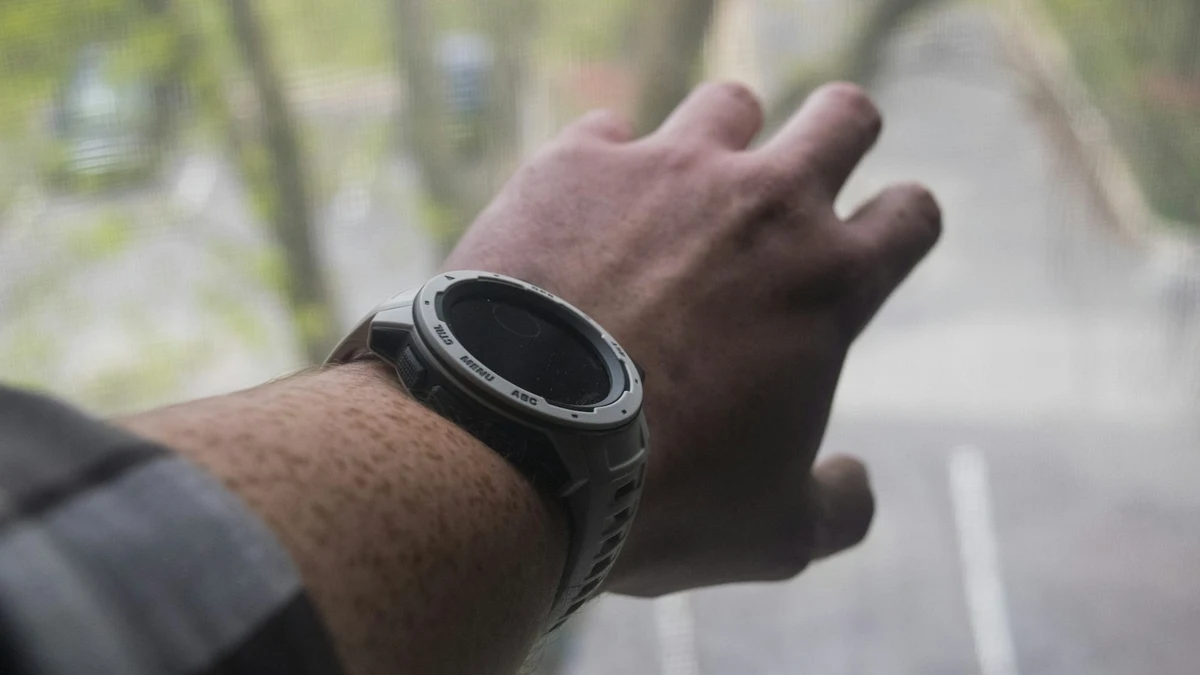
Watches are the most confusing case. A cellular smartwatch has an eSIM inside, but it does not accept a profile from just any provider. Its plan is tied to the carrier and the phone number of the phone it is paired with.
Apple Watch. Apple says your iPhone and Apple Watch must use the same carrier, and that prepaid accounts are not supported (Apple support, September 2026). Cellular is set up from the Watch app on the iPhone, not by scanning a QR code. Apple’s rules leave no route for a data-only travel eSIM from another provider.
Galaxy Watch and Pixel Watch. Samsung activates watch plans through the Galaxy Wearable app with a plan from your phone’s carrier. Google says the Pixel Watch gets the same number as your phone once you activate LTE with a compatible carrier. Our device list names several LTE Galaxy and Huawei watches as eSIM hardware, but the plan route on those watches still runs through the companion app. Ask support before you buy anything for a watch.
The good news: the watch rarely needs its own connection. Apple notes that the watch uses Bluetooth when the iPhone is nearby, and it can also join a known Wi-Fi network. With a travel eSIM on the phone, messages, maps and notifications reach the wrist through the phone.
Watch roaming on your home plan is a separate question. Apple says it needs Series 5 or later and a carrier that supports VoLTE and roaming; Google says Pixel Watch 2 does not roam between Europe and North America.
Laptops: Windows PCs and Chromebooks with eSIM, Macs without

Windows. Some Windows 10 and 11 laptops have a built-in cellular modem with an eSIM. Microsoft’s path is Settings > Network & internet > Cellular > eSIM profiles > Add profile. You can then scan the QR code with the laptop’s camera or enter the activation code by hand. Roaming lives under Cellular > Data roaming options. If the Cellular page or the Manage eSIM profiles link is missing, the laptop has no eSIM.
Chromebook. Chromebooks with eSIM and ChromeOS 92 or later use Settings > Mobile data > Add cellular. The camera scans the QR code, and Google lets you store up to five eSIM profiles. Abroad, turn on Allow mobile data roaming. One trap: you need Wi-Fi or Ethernet while you add the profile, so do it at home.
Mac. No current Mac has a cellular modem. The MacBook Air, MacBook Pro and MacBook Neo spec pages mention no cellular, LTE or eSIM. A Mac abroad goes online through Wi-Fi, or through a phone or iPad hotspot if your plan allows it (check with support).
Windows PCs and Chromebooks are not yet on our published device list. They accept standard eSIM profiles by QR code or activation code, but confirm your model with support before you buy a plan for a laptop.
Sharing the phone’s connection instead
For a Mac, a Wi-Fi-only tablet or an e-reader, the usual answer is the phone’s hotspot. On an iPhone, Apple’s path is Settings > Cellular > Personal Hotspot. Apple adds a detail that matters for travel: with two lines, the hotspot uses the line you selected for cellular data. On a Pixel, it is Network & internet > Hotspot & tethering, with Data Saver off.
Apple also notes that if Set Up Personal Hotspot is missing, the carrier has to add it to the plan. Torrum’s Terms do not cover tethering either way, and every megabyte the phone sends counts, whichever device asked for it. If a laptop on the phone’s hotspot is central to your trip, ask support whether it works at your destination before you rely on it.
👉 Keeping your home number for calls and bank codes while the eSIM handles data? See our guide to keeping your number abroad.
Second screens burn data quietly: what to switch off
Tablets and laptops wake up on a new connection and start syncing photos, backups, updates and cloud folders that were waiting for Wi-Fi.
On a metered plan this adds up. Torrum’s Terms count all data sent to and from the device, including background transfers you have not disabled. Each session is rounded up to the nearest 100 KB, so dozens of tiny background checks can add up to several megabytes, even if each sends only a few kilobytes.
Before the trip, turn these down on any second device:
- Low Data Mode on iPad. Turn it on under Cellular Data Options; Apple says it pauses iCloud Photos updates and Background App Refresh.
- Per-app cellular access. In Settings > Cellular Data, switch off cellular for apps that only need Wi-Fi. They wait for the hotel network instead.
- Backups over cellular. Some 5G iPads offer iCloud Backup over cellular. Leave it off while roaming.
- Low data mode on the Mac. When a Mac joins a phone hotspot, set Low data mode in that network’s Wi-Fi details.
👉 For real numbers per app, see how much mobile data you need for a trip.
Device by device: what can hold its own eSIM
| Device | Own travel eSIM? | How it gets online abroad | Check before you buy |
|---|---|---|---|
| iPhone, eSIM Android phone | Yes | Its own eSIM | Model, carrier lock |
| iPad Wi-Fi + Cellular | Yes, data only | Its own eSIM | Model number on our list |
| iPad Wi-Fi only | No | Wi-Fi or phone hotspot | – |
| Galaxy Tab 5G/LTE | Yes on listed models | Its own eSIM | Model code; Wi-Fi-only models can’t |
| Apple Watch cellular | No (same carrier as iPhone) | Through the paired iPhone | Home carrier’s watch roaming |
| Galaxy, Pixel LTE watch | Plan via phone’s carrier | Through the paired phone | Ask support first |
| Windows laptop with eSIM | Possibly; not on our list yet | Its own eSIM, once confirmed | Ask support with the model |
| Chromebook with eSIM | Possibly (ChromeOS 92+); not on our list yet | Its own eSIM, once confirmed | Ask support; add it on Wi-Fi |
| MacBook | No modem | Wi-Fi or phone hotspot | Ask support whether hotspot works |
Torrum plans: one trip, three ways to cover the devices
The plans are the same for every device; what changes is the split. Current Italy prices:
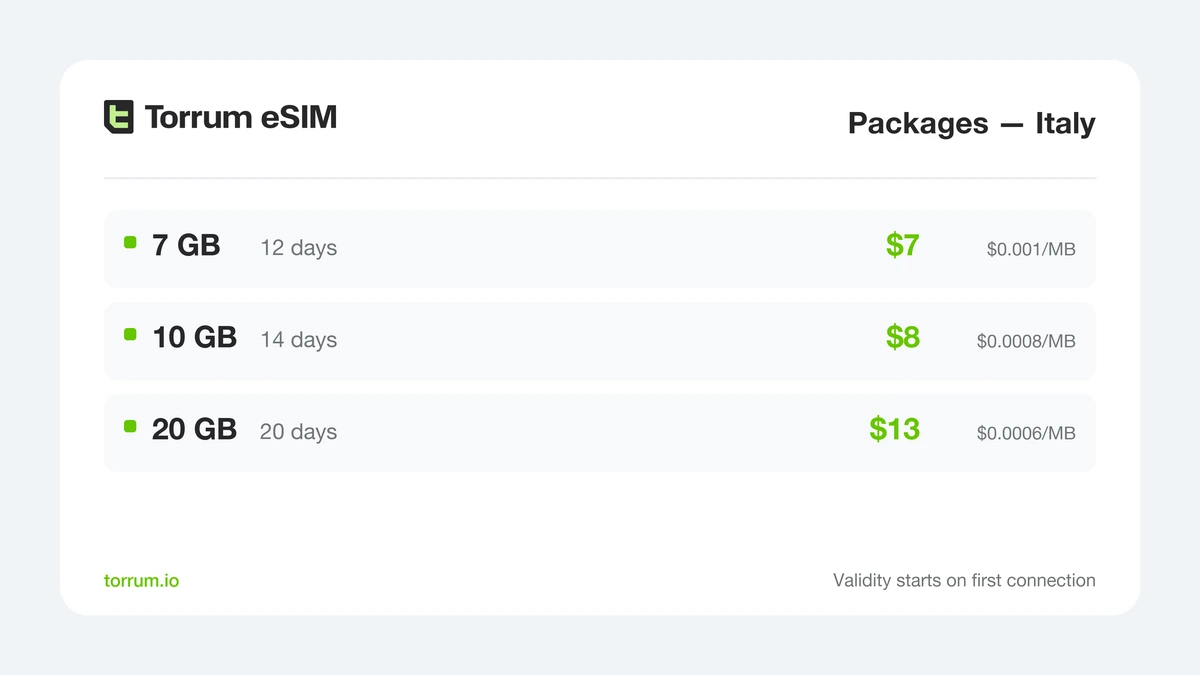
Italy packages: a phone and a cellular iPad on the same trip can each carry one.
Packages suit a device you know you will use every day, such as the phone or a tablet that handles maps and video. The validity starts on first connection, and a package expires on its date whether the data is used up or not.
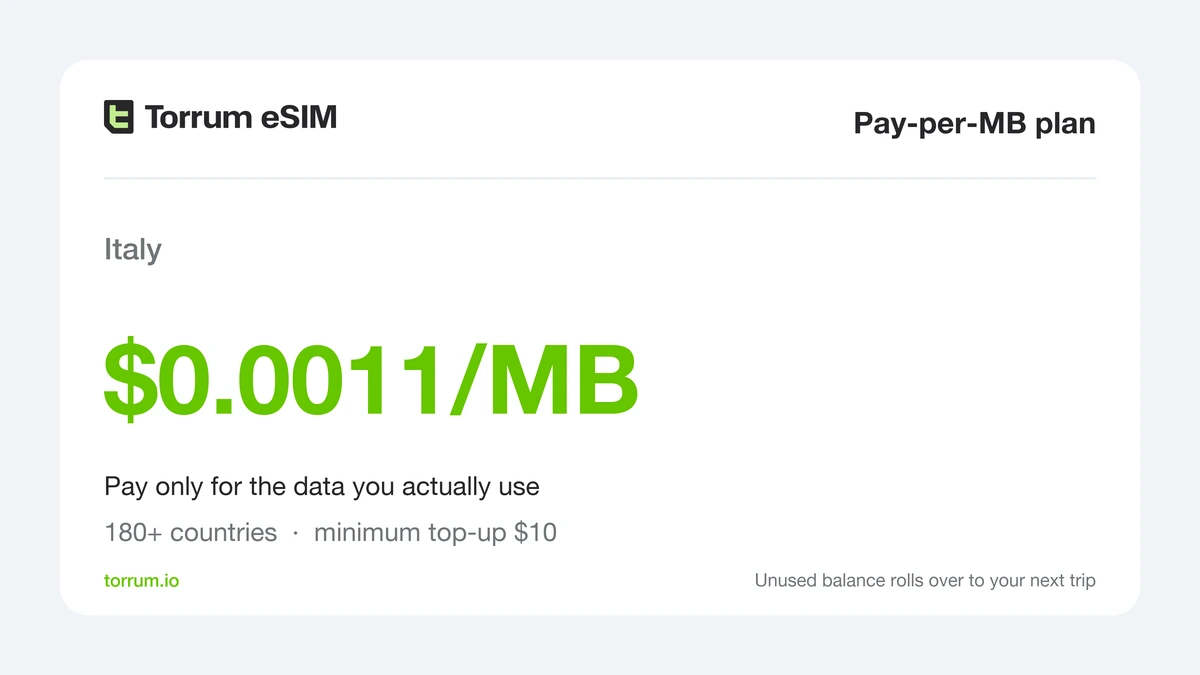
Pay-per-MB in Italy: a sensible fit for a laptop or tablet that only goes online now and then.
Pay-per-MB charges $0.0011 per MB in Italy. It works across 180+ countries, the minimum top-up is $10, and the balance stays for your next trip. That suits a backup device that might stay on hotel Wi-Fi most days.
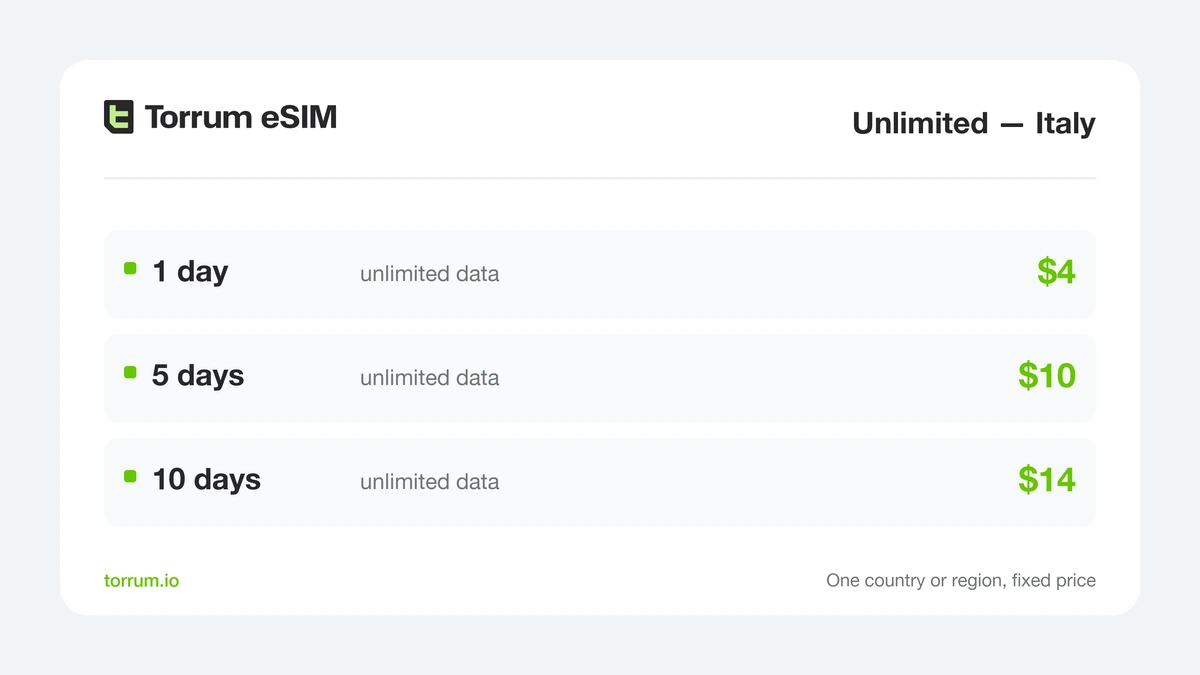
Unlimited day passes for Italy: no counter to watch on the device that works hardest.
Unlimited fits the device you lean on most, such as a tablet for streaming or an eSIM laptop that support has confirmed. Fair use applies: above the high-speed allowance, speeds may be reduced, though messaging, email and navigation usually keep working.
Setup is the same everywhere: create an account with Google, Apple or Telegram, pay by card, and scan the QR code on the device itself (step-by-step guide). Install on home Wi-Fi and leave the line off until you land.
A simple split for a typical Italy trip:
- Phone only, watch paired: one package on the phone; the watch rides on it via Bluetooth.
- Phone plus cellular iPad: a package on each, or a package on the phone and Pay-per-MB on the iPad if it mostly stays on Wi-Fi.
- Phone plus a MacBook: one larger package on the phone, after checking with support that the hotspot works there.
- Work trip with an eSIM laptop support has confirmed: Unlimited on the laptop for the busy days, a package on the phone.
FAQ
Can I use one Torrum eSIM on my phone and my iPad?
Not at the same time. For both devices online together, buy a separate plan for the iPad, or ask support whether you can share the phone’s connection.
Can I move my eSIM from the phone to the tablet?
Yes. Delete the eSIM completely on the phone while it is online, then install it on the tablet. The QR code allows up to three installs.
Does a Wi-Fi-only iPad work with a travel eSIM?
No. Only Wi-Fi + Cellular iPads take a cellular plan. A Wi-Fi-only model can use hotel Wi-Fi, or a phone hotspot if your plan allows tethering.
Can I make calls on an iPad with a travel eSIM?
Not over the mobile network. Apple says cellular iPads support data only, and Torrum plans are data only too. App calls over the data connection work as usual.
Can I put a Torrum eSIM on my Apple Watch?
Not in practice. Apple requires the watch to use the same carrier as the iPhone, and cellular is set up through the Watch app. Keep the eSIM on the iPhone and the watch connects through it.
Does a Galaxy Watch LTE work with a travel eSIM?
Samsung activates watch plans in the Galaxy Wearable app with a plan from your phone’s carrier. Message our support with the model code before buying.
Can a MacBook use an eSIM?
No current Mac has a cellular modem. Connect it to Wi-Fi, or to a phone or iPad hotspot after checking with support that tethering works on your plan.
How do I know if my Windows laptop has eSIM?
Open Settings > Network & internet. If there is a Cellular page with eSIM profiles, the laptop can hold one. If not, it cannot.
Why did my tablet use so much data on day one?
Background sync: photos, backups and updates that waited for a connection. Turn on Low Data Mode and switch off cellular for apps that can wait.
Can I use Torrum at home on my tablet?
No. Torrum is built for trips abroad; its Terms do not allow use in the country where you normally live.
What if my device turns out not to support eSIM?
Our Terms do not refund plans bought for a device without eSIM support. Check the model on our device list or ask support first.
Final thoughts: connect the devices that can, pair the rest
Phones, cellular iPads and listed Galaxy Tabs can each run their own travel eSIM. Windows laptops and Chromebooks with eSIM accept profiles by QR code, but confirm the model with support first. Smartwatches stay tied to the phone’s carrier, and Macs have no modem, so both go online through the phone or Wi-Fi.
The money rule: one eSIM for each device that must be online at once, bought after the model check, and background sync off on every second screen.
👉 Pick a Torrum plan for Italy or browse packages for other countries.


 Continue with Google
  Continue with Telegram

